Amazon Brand Store Design Services: What a Good Storefront Includes (with Examples)

A good Amazon Brand Store design service will take your product catalog and turn it into a great store to shop in.
A professional store needs much more than a pretty homepage. It needs clear navigation, useful category pages, mobile-friendly images, correct product links, and a plan for publishing and reviewing the store.
Amazon offers Store Builder and hosting at no cost to eligible brands. A designer or agency would be a separate cost.
You pay the provider to plan how the shoppers are going to browse your products, to create the designs, to build the pages as agreed, to check Amazon's requirements, and to assist with the review of the performance.
A clear proposal should set out these services prior to the design work commencing.
If you just need the setup instructions, then have a look at our guide on how to set up an Amazon storefront.
This article is about what to expect when you're hiring in the way of professional design help.
What should a good Amazon Brand Store include?
A good Amazon Brand Store will help the shopper to identify your brand, find the right category, browse the products, and get to the relevant product detail pages.
The layout should be in line with your catalog. There's no set number of pages or design tiles that will work for every brand.
Start by thinking about what the shopper wants to find.
For instance, a beauty brand might have their skincare products grouped by skin concern, and a home storage brand might have their products grouped by room.
The homepage should have these categories. Each category page should be set up to help the customer work down the list and find the right product.
It shouldn't be sending them to unrelated collections.
A small catalog might only require a simple path from the main product to the relevant accessories.
A bigger catalog generally requires more categories and more clearly defined labels.
Ask the designer to explain which products go on the homepage, which categories require their own pages, and which sections should link out to the product detail pages.
Amazon's Store creative guidelines detail requirements for hero images, logos, tiles, and designs that will be responsive across different screen sizes.
Amazon's current Brand Stores specifications require a hero image of at least 3,000 × 600 pixels and a brand logo of at least 400 × 400 pixels. Each has a 5 MB maximum file size.
Keep essential text, products, and branding within the hero image's central safe zone. Amazon notes that up to 15% may be cropped from each side on some displays. Ask the designer to provide mobile and desktop previews before approving the final artwork.
Also remember that Amazon Brand Story and Amazon A+ Content appear on the product detail page.
A Brand Store is a separate shopping destination which allows the visitor to browse the brand's catalog.
These features can be the same brand style, but they are different design projects.
What's included in the Amazon Brand Store design services?
A full Brand Store design project typically kicks off with a catalog review.
The designer then goes on to plan the pages, create the images and copy, build the store, and check it all is complete before launch.
However, not every agency will provide the same range of services.
Ask the provider to split out the included work from the optional services and to clearly explain who is going to do what.
The Deliverables to Request in Writing
Some services may need separate pricing, including:
- Product photography
- Custom videos
- Detailed photo editing
- New copy for several categories
- Campaign-specific landing pages
- Ongoing maintenance after launch
- Extra revision rounds
Don't assume they're included just because the agency offers "full storefront design".
The contract should specify who is responsible for submitting the Store to Amazon, who is responsible for handling rejected content, and who is responsible for the duration of time that corrections are included.
It should also explain who holds the editable design files.
Do not share your primary account password with a design agency. Instead, provide the appropriate authorized access for the agreed work, subject to the permissions available in your account. Retain control over final approval and review, or remove access when the engagement ends.
Your brand should retain ownership of the Store and the ASINs. The agreement should clearly define the agency's rights to its own design work.
If you need listing images, Store design, and advertising creative together, compare the services under Amazon creative services.
Even at that stage, the Store project should have its own page plan and asset list.
Amazon Brand Store Examples: What to Learn From Each
When looking at the Amazon Brand Store examples, pay attention to how the design facilitates the shopping experience.
Don't pick a design just because you like the colors of it.
Look at the journey of a shopper from the home page to a product. Then check that same journey works on a phone.
The following are examples taken from Amazon's published material. Their current layout and availability may have changed.
SnailCure: Make Nail-Care Products Easy to Find and Explore
SnailCure's Amazon UK Brand Store, reviewed on November 10, 2026, shows how to organize nail-care products around clear categories and product education.
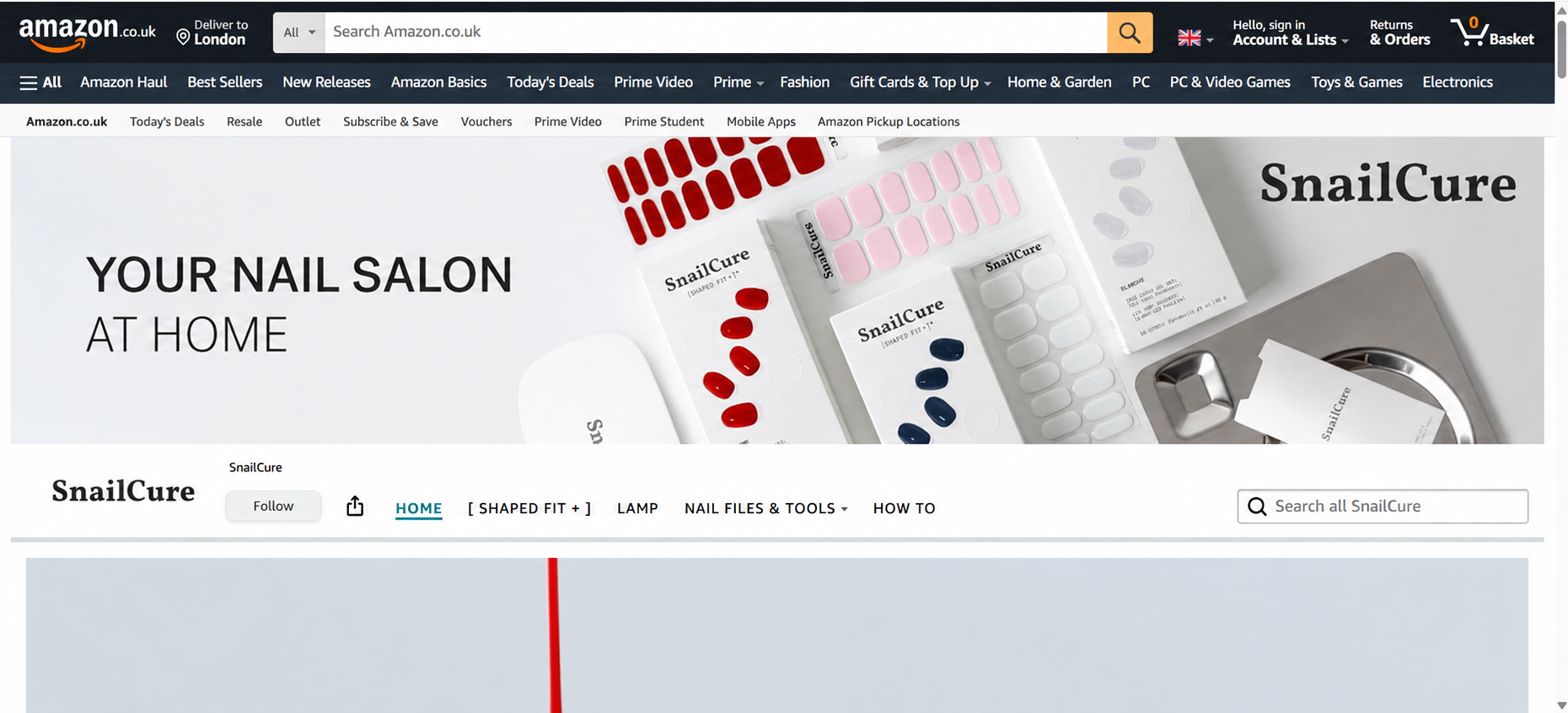
The Store uses the message "Your Nail Salon at Home" to introduce its range of gel nail strips and nail-care tools.
Its navigation separates SHAPED FIT +, Lamp, Nail Files & Tools, and How To. The Nail Files & Tools section also provides links to Glass Nail Tools and Eco Nail Files.
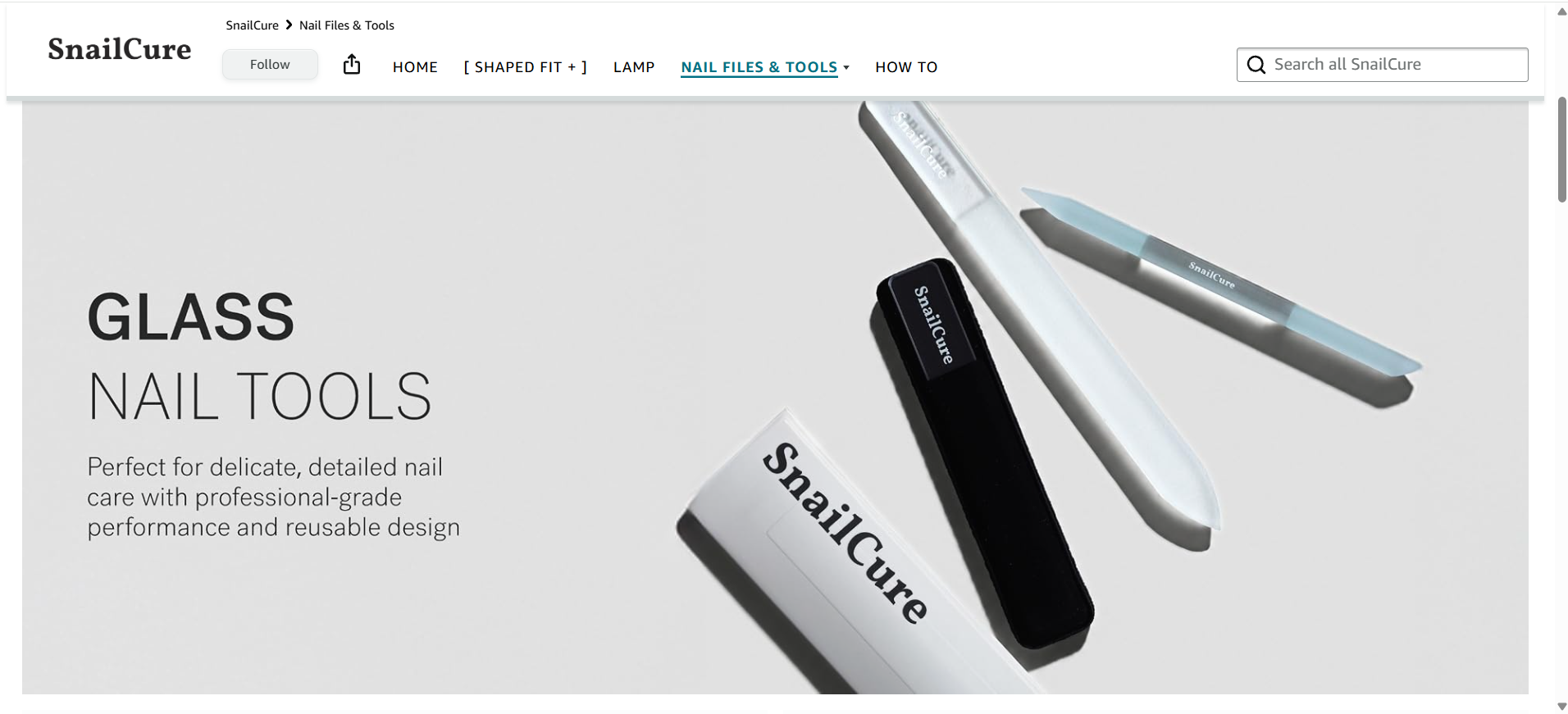
This helps shoppers explore specific product categories instead of searching through one large collection.
The How To section gives customers a separate place to find product-use information, keeping educational content distinct from product browsing.
Mobile design lesson: The Store uses responsive hero images designed to adapt to different screen sizes.
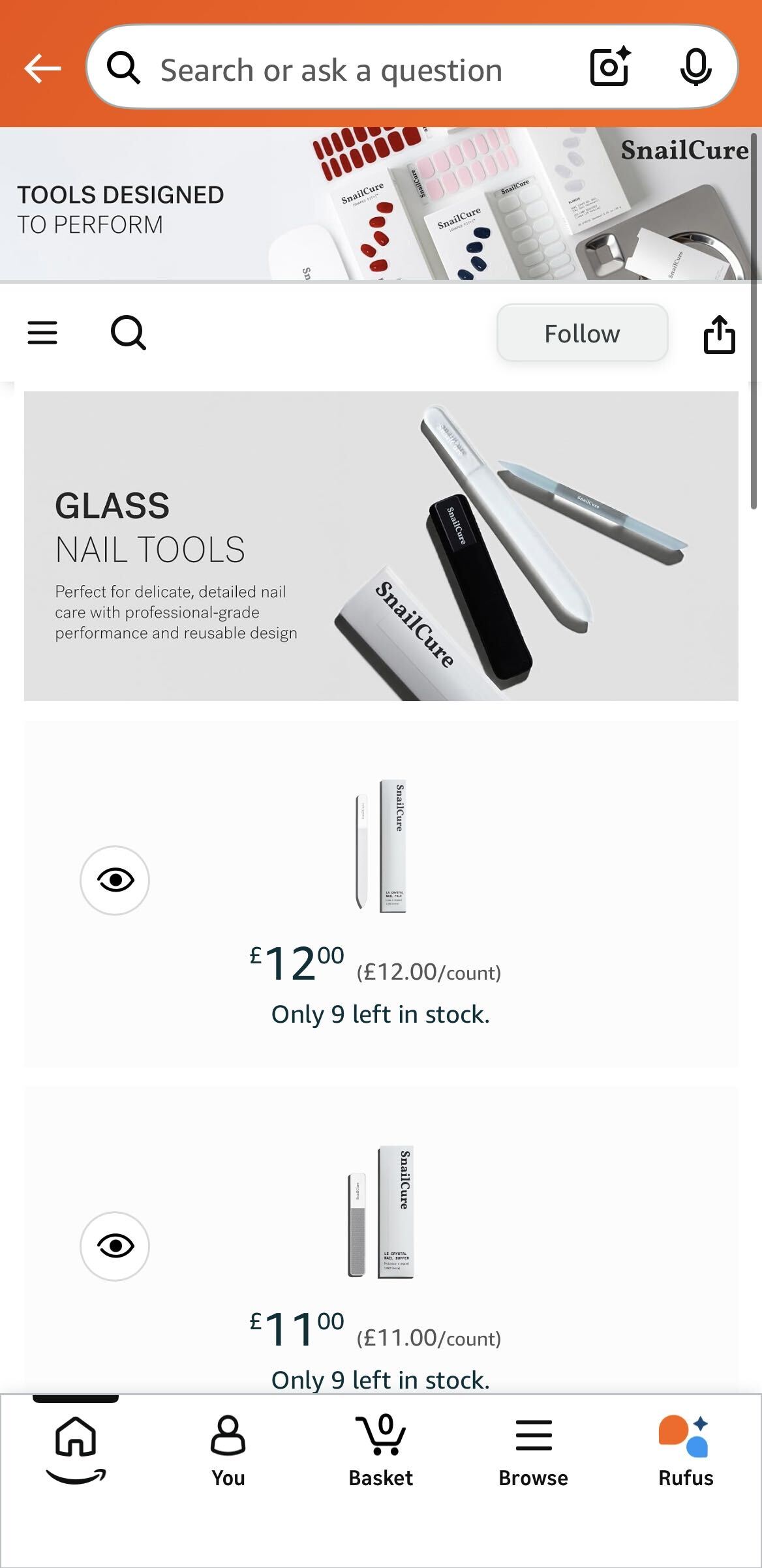
When planning a similar Store, check that the homepage message remains readable, category links are easy to tap, and shoppers can reach the right products without unnecessary scrolling.
Ask the designer to provide mobile previews of the homepage and key category pages, along with a navigation map showing how shoppers move from categories to relevant product detail pages.
This example reflects the Store's structure in the supplied HTML, not a verified mobile usability test or evidence that SalesDuo designed the Store.
The Face Shop: Make Product Discovery and Education Work Together
Amazon Ads documented The Face Shop's 2022 Brand Store redesign. The project emphasized mobile-first layouts, product-benefit messaging, shoppable images, videos, and dedicated pages for bestsellers and gift sets.
This is a historical design reference from Amazon's published case study, not an assessment of The Face Shop's current Store or evidence of work performed by SalesDuo.
Rather than have all the products on show together, the Store offered shoppers a number of ways to find what they were looking for.
The content also enabled the user to understand the ingredients and how the product was to be used.
Mobile design lesson: the team made mobile design a priority.
When you're planning your own beauty store, ask yourself how the category links and the product benefits will appear on a phone.
Shoppers should be able to find the product without having to scroll through a lot of videos and large decorative images.
This is a case study on a previous project. It is not in any way a verified review of The Face Shop's current live store.
mDesign: Make a Large Catalog Easy to Shop
Amazon's published Brand Store example gallery includes mDesign, a home organization brand.
It's a useful reference for sorting out a big catalog by category.
For a larger home organization catalog, a useful design approach is to group products by room or storage need. A sample route to request from a designer is:
Shop by Room → Storage Collection → Relevant Product
This is an illustrative page structure, not a verified record of mDesign's current Store navigation.
This is far more useful than just displaying a bunch of unrelated products on the home page.
Mobile design lesson: Check that the category tiles are still easy to read and easy to tap when the desktop nav becomes the smaller mobile menu.
Ask the designer to show you the mobile previews of both the homepage and the category pages.
The published gallery doesn't confirm mDesign's current navigation or mobile performance.
SkinnyPop: Keep Categories Clear for a Focused Product Range
Amazon's example gallery also has SkinnyPop.
For a food brand with related products, a designer might organize collections by flavor, pack size, or product type. The right structure depends on the actual catalog and shopper needs.
This is a suggested design approach, not a confirmed description of SkinnyPop's current Store. Ask the designer to justify each proposed page and show how it helps shoppers find a product.
Mobile design lesson: Check that the product names and labels are still readable when you have large images that are cropped.
The next shopping action should also be easy to find.
These are design checks based on Amazon's own examples, not any claims as to the state of SkinnyPop's store or sales at the moment.
How to Brief an Amazon Storefront Design Agency
A clear project brief will enable the designer to understand your catalog, your shoppers, and your approval process prior to them even beginning.
It also reduces the number of revisions that are caused by missing ASINs, unapproved claims, orlast-minutee changes to the page plan.
Use this checklist when you're requesting proposals so that every designer gets the same information.
- Brand and access: Your U.S. marketplace, Brand Registry status, account owner, and your Store Builder permissions.
- Catalog: Current ASINs, key categories, upcoming launches, the inactive items, and those that shouldn't be in the catalog at all.
- Audience and objectives: Explain who the audience is for each page and what they should be able to find or compare.
- Brand assets: Share logos, brand guidelines, licensed images, editable files, and existing videos.
- Product claims: Provide the approved wording, supporting evidence, and the person responsible for approving the sensitive claims.
- Campaign calendar: seasonal promotions, Sponsored Brands landing pages, and content deadlines.
- Review process: Name one key decision maker, feedback deadlines, file handover procedures, and the revision approval process.
Include a simple page map such as:
Home → Shop by Need → Category Collection → Product Detail Page
For every planned advertising landing page, identify one key shopping path.
Ask the designer to return an updated version of the map with the proposal.
For major campaigns, provide the designer with approved messaging and the products expected to be available when shoppers reach the Store. Have the brand's account owner confirm the featured products before launch.
How to Judge a Storefront Design Proposal
The ideal design proposal would clearly articulate what is to be delivered, how the store will function, who is going to build it, and what level of support will be available post-launch.
Price on its own doesn't indicate whether the Store will meet Amazon's requirements or whether shoppers will be able to find the products they're looking for.
Just ask for two recent projects (ideally ones with catalogs similar to your own).
Have the designer walk through the homepage, one category path, and a real mobile screenshot.
The aim is to work out why the designer structured the store the way they did, rather than simply assess how pretty it is.
Be careful with vague promises.
If a provider promises unlimited revisions, ask what counts as a revision, whether changes to approved pages are included, and which requests trigger additional charges.
If a provider promises a fully launched Store, ask who submits it for Amazon review, responds to rejected content, retests the live pages, and confirms final acceptance.
If a provider promises all creative assets, request an itemized deliverables list showing dimensions, formats, file types, editable originals, usage rights, and the number of approved variations.
Accessibility matters as well.
Text within images doesn't work very well with screen readers. Amazon would recommend using tile formats that support text where possible.
Ask for readable fonts, clear category labels, good color contrast, and alternative text where applicable.
Check that every clickable image or link takes you to the right place.
Also look at how Sponsored Brands ads can be linked to Store pages.
An ad for a particular product family should take the user to the appropriate page rather than having them go back to the home page.
Ask who's going to be reviewing Store Insights once it's launched.
What does brand store design cost, and what changes the quote?
Amazon states that setting up and maintaining a Brand Store is free for eligible brands.
You pay a designer or agency for their work, not for Amazon hosting.
There is no such thing as a standard design fee, as the scope of services involved in any given project can be very different.
The main cost factors include:
- Number of Store pages
- Complexity of page layouts
- Original images or videos
- Catalog cleanup
- Copywriting
- Content for different languages or markets
- Revision rounds
- Store Builder setup and uploads
- Maintenance after launch
A complete project quote may combine base design work, additional pages, custom imagery or video, copywriting, Store Builder implementation, moderation corrections, revision overages, and optional maintenance. Ask providers to identify which items are included in the base fee and which require separate approval.
Updating an existing Store is different from building a new Store with a number of product categories.
To compare proposals fairly, ask every provider to quote the same project requirements:
Homepage + Named category pages + Asset list + Revision rounds + Store Builder/upload owner + Amazon review corrections + Final files + Optional maintenance
The quote should also list the excluded services, the materials your brand is responsible for providing, and the fees applicable for any changes requested after approval.
Treat the provider's published starting price as their offer, not as the average market price.
Request an itemized quote based on your catalog and deadline.
What happens after the store is published?
A Store project is not complete just because the designs have been uploaded.
The live pages, product links, and reporting handover should all work as agreed.
Amazon may request changes during review, so the project needs someone responsible for making corrections and checking the final live Store.
Before accepting the work:
- Open the homepage on a phone.
- Check whether the hero image is cropped correctly.
- Confirm that category labels, key product messages, and clickable tiles remain readable and usable on mobile, including any custom mobile images.
- Test the menu and category tiles.
- Open links to confirm they reach the right live ASINs.
- Check the text against approved product claims.
- Confirm that Sponsored Brands ads lead to the intended Store pages.
Before signing off, request the final approved page list, editable design assets, live Store URL, list of corrected moderation issues, outstanding tasks, and the named owner for future updates. Record the initial Store Insights reporting period so later comparisons use a documented starting point.
A desktop preview alone is not enough.
After launch, use Store Insights to record starting performance, including visits, page views, traffic sources, and attributed sales where available.
Compare results after advertising campaigns, catalog updates, and seasonal changes.
These reports show activity connected to the Store. They do not prove that new designs alone caused changes in sales.
Review the Store when products go out of stock, collections change, or promotions end.
Assign one person to track updates so old pages and campaign images do not stay live longer than intended.
Get a Brand Store Designed for How Shoppers Buy
A good Brand Store should help shoppers find products and be easy for your team to maintain.
Before approving a design quote, request a page map, complete asset list, mobile previews, clear responsibilities, revision rules, and a reporting handover plan.
If you are planning a new Store or updating an existing one, discuss your navigation problems, creative needs, and launch plans with SalesDuo.
Book Your 1:1 Growth Call with SalesDuo.
Frequently Asked Questions About Amazon Brand Store Design
What Is Included in Amazon Brand Store Design Services?
A typical proposal may include catalog review, page planning, approved images and copy, revisions, and quality checks.
Store Builder uploads, Amazon review corrections, and ongoing updates should be listed separately.
Is an Amazon Brand Store Free?
Yes. Amazon offers free Brand Store creation and maintenance to eligible brands.
Hiring a professional designer or agency is optional and costs extra.
Do I Need an Agency to Build a Store?
No. Amazon Store Builder allows eligible brands to create their own Stores.
Professional help may be useful when you need custom designs, planning for a large catalog, or support building and publishing pages.
What Should I Send a Designer First?
Share your brand guidelines, licensed images and files, current ASINs, important categories, target customers, approved product claims, campaign dates, and the person responsible for final approval.
How Many Revisions and How Much Time Should I Expect?
Both depend on the contract, available assets, number of pages, and Amazon’s review process.
Agree on revision rounds and a project schedule before work begins rather than assuming a standard delivery time.
Who Can Access, Publish, and Revise the Store?
Access depends on the brand’s eligibility and account permissions.
The contract should identify who builds the pages, submits them to Amazon, handles rejected content, and makes future updates.
How Is a Brand Store Different From Brand Story?
A Brand Store is a shopping destination with pages that organize a brand’s products.
Brand Story appears within the product detail page.
Both support the brand, but they serve different purposes.
How Do I Judge Results After Launch?
Use Store Insights to review visits, page views, traffic sources, and available sales data.
Compare time periods carefully because advertising, inventory, and traffic changes can affect performance.
Can Sponsored Brands Ads Send Shoppers to a Store?
Yes. Choose the Store page that best matches the ad’s message.
Before launching, check that the destination and featured products are correct.
About the Author
Meet Aryan Suyal, an SEO Content Writer Intern at SalesDuo who excels at turning patterns into precise, on-point content. He brings sharp insights and analytical thinking, along with a builder's instinct for creating systems that help ideas work smarter. Outside of work, you'll find him getting lost in books, tinkering with and building AI systems, or losing hours to a good documentary.