What Is Amazon EDI? Common Mistakes, Errors, and FAQs

Amazon EDI is the system that Vendor Central suppliers use to exchange business documents with Amazon electronically. It can transmit purchase orders, order acknowledgments, ASNs, invoices, and inventory updates without the need for manual entry. The major threats for Amazon vendors tend to be incorrect item data, late or missing ASNs, invoice mismatches, label issues, and unclear ownership when an EDI error occurs.
This article covers the basics and common mistakes. For deeper setup steps, see the SalesDuo Amazon EDI guide.
Amazon EDI at a Glance
How Amazon EDI Works in Vendor Central
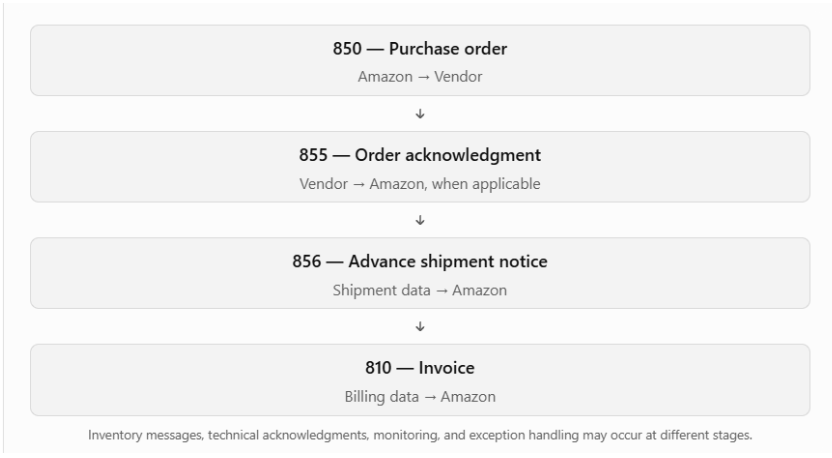
In a typical Vendor Central workflow, Amazon sends a purchase order. The vendor then sends an order acknowledgment.
The warehouse or third-party logistics provider prepares the shipment and confirms the final Packed quantity, cartons, details, and labels with the Vendor. The vendor or its integration provider sends the advance shipment notice (ASN) using the method recognized by that Vendor Central account. The invoice is sent as per the billing process in use.
Requirements may differ depending on the customer account, program, location, or fulfillment arrangement. Check Vendor Central regularly to make sure your team is following the latest instructions. EDI involves more than simply sending files.
The documents depend on data from your catalog, ERP, warehouse, carrier, 3PL, and finance systems. A file can transmit successfully and still cause problems if the information inside it is wrong.
For more detail on setup and compliance, review the SalesDuo Vendor Central EDI setup guide.
Key Amazon EDI Documents and What They Do
Vendor teams often work with document codes such as 850, 855, 856, 810, 846, and 997.
These are common business messages, but not every Amazon vendor uses every document in the same way. Confirm your account-specific requirements before treating any document as mandatory.
The code itself is only part of the picture.
What matters is whether the same item, quantity, date, carton, label, shipment, and invoice information stays consistent from the purchase order through receiving and payment. If these details change between systems, the EDI may be technically correct-but unreliable in day-to-day operations.
What Is an Amazon EDI System?
An Amazon EDI system is the technology and process used to move structured business documents between Amazon and a vendor's systems.
It may include:
- ERP
- EDI provider or translator
- Document mapping
- A secure connection such as AS2 or another approved method
- Testing
- Monitoring
- Error alerts
A good setup does more than transmit a file.
It should keep source data accurate, map fields correctly, show whether documents were accepted or rejected, and give a named owner a clear process for fixing problems.
Some vendor workflows may also use Amazon APIs. EDI and APIs can support different processes, so the right setup depends on the vendor program and integration design.
Common Amazon EDI Mistakes
ASN and carton mismatches can also cause receiving disputes. For more detail, see shortage claims on Amazon Vendor Central.
Invoice, label, and compliance errors can also lead to deductions. Review the SalesDuo guide to Amazon Vendor Central chargebacks for that separate process.
How to Troubleshoot Amazon EDI Errors
When an EDI error appears, first narrow down the problem before changing mappings or resending files.
A simple first-response process can reduce delays between operations, IT, finance, and outside partners.
- Identify the document type and affected PO, invoice, ASN, or shipment.
- Record the EDI control number, document number, and relevant timestamps.
- Verify the sender and receiver IDs and the path of the connection.
- Paste the exact error message or current notice from Vendor Central.
- Validate EDI data against source ERP, warehouse, 3PL, or finance record.
- Do not assume a document was accepted for business processing just because a technical acknowledgment was received. Check the applicable processing status and error messages as well.
- Physically match the carton or pallet data against the ASN and labels for shipment issues.
- In case of invoice disputes, match the PO, receipt, invoice, terms, taxes, quantities, and totals.
- Attach the sample file, screenshot, and the log file to escalation.
If the issue occurs once, correct the issue in either source data or mapping and retest. If the same issue repeats itself across shipments, document types, or teams, then the problem is likely larger than one manual fix.
Amazon EDI Contact: How to Escalate Support Issues Safely
To report an EDI issue, sign in to your Vendor Central account and make use of the support or integration-help options available within your vendor program. Choose the issue category that best reflects the problem displayed in your account.
Please note that support menus and routing can vary, so it's better to read the live account as opposed to older contact lists or unverified email addresses.
A useful support case should include:
- Document type
- PO, invoice, or ASN number
- EDI control number
- Timestamps
- Sender and receiver IDs
- Connection method
- Exact error message
- Sample file, where needed
- Screenshots or integration logs
When details are explicit, it is easier to interpret whether this problem is coming from Amazon, an internal mapping, source data, the warehouse, or the connection.
When Amazon EDI Automation Becomes Worth It
Automation is especially helpful when the same errors keep happening, the number of purchase orders increases, or teams spend a lot of time fixing problems by hand.
To figure out the manual workload, multiply the number of EDI errors each month by the average time it takes to fix one error and the average hourly cost of the employees involved. This calculation only covers rework labor. Keep shortage deductions, chargebacks, and shipment delays separate so you do not count the same costs twice.
If there are ongoing problems with ASN, invoices, labels, acknowledgments, or mapping, it may help to monitor the workflow more closely and make sure responsibilities are clearly assigned.
A managed approach can help coordinate:
- Mapping
- Testing
- Monitoring
- Error handling
- Operational handoffs
The process should still follow current Amazon requirements and fit your ERP, warehouse, 3PL, and finance workflows.
If repeated errors are creating operational risk, review SalesDuo’s Amazon EDI automation support.
Build a More Reliable Amazon EDI Workflow
Amazon EDI is most effective when the technical connection and the business process are managed together. Correct master data, clear document ownership, shipment discipline, invoice matching, acknowledgments, monitoring, and rapid escalation all matter.
If these areas are weak, the same EDI problem can return even after the file is resent.
If Amazon EDI errors keep slowing down POs, ASNs, invoices, labels, or claim prevention, SalesDuo can help connect the different parts of the process.
Book Your 1:1 Growth Call with SalesDuo.
Frequently Asked Questions about Amazon EDI
What Is Amazon EDI?
Amazon EDI is a system-to-system method that Vendor Central suppliers use to exchange structured business documents with Amazon.
Common examples include purchase orders, order acknowledgments, advance shipment notices, invoices, inventory updates, and technical acknowledgments.
What Is an Amazon EDI System?
An Amazon EDI system combines the technology and processes used to translate, map, send, test, monitor, and troubleshoot EDI documents.
It can connect Amazon with a vendor's ERP, warehouse, 3PL, finance system, or integration provider.
Is Amazon EDI the Same as Seller Central?
No.
This article focuses on Vendor Central and 1P vendor workflows. Seller Central uses a different operating model.
If your team is unsure which model applies, review Vendor Central vs Seller Central.
Which Amazon EDI Documents Matter Most?
Some of the more common EDI documents are:
- 850 purchase orders
- 855 order acknowledgments
- 856 ASNs
- 810 invoices
- 846 inventory updates
- 997 technical acknowledgments
The exact document requirements vary by account and program. Confirm your current Vendor Central setup before treating any document as required.
What Is an ASN in Amazon EDI?
ASN stands for advance shipment notice.
It tells Amazon what is being shipped and how the shipment is packed.
Item quantities, carton or pallet structure, labels, and shipment details should match the physical shipment and current Vendor Central requirements.
What Causes Amazon EDI Errors?
Some common causes are:
- Master data is incorrect
- Items or units of measure do not match
- Advance shipment notices are late or missing
- Invoices do not match
- Labels or cartons are different
- Acknowledgments are ignored
- There are connection problems
- It is not clear who is responsible across IT, operations, 3PL, and finance teams.
How Do I Contact Amazon About EDI?
Use the current support or integration-help options available in your Vendor Central account. Include the affected PO, ASN, or invoice number, EDI control number, timestamp, sender and receiver IDs, connection method, exact error message, and relevant logs or sample files. Do not rely on an old or unverified support email address.
Can Amazon EDI Reduce Shortage Claims and Chargebacks?
Well-managed EDI can reduce avoidable errors related to data, timing, labels, ASNs, and invoices.
It does not guarantee that every shortage claim or chargeback will disappear. Receiving, commercial, operational, and dispute issues can also affect these cases.
Does Amazon EDI Replace SP-API?
Not always.
EDI and Amazon APIs can support different vendor workflows.
The right setup depends on the program, process, and systems involved. Confirm Amazon's current options before changing an existing setup.
When Should a Brand Use Amazon EDI Automation Help?
Think about external support when:
- Mistakes repeat
- Volume of transactions grows
- Heavily dependent on manual solutions
- Monitoring is poor
- Problem with PO, ASN, invoice, label, shortage, or chargeback impacts several teams.
About the Author
Meet Srushti P. Borle, an SEO Content Writer Intern at SalesDuo who enjoys turning complex ideas into clear, easy-to-read content. She focuses on creating smooth, engaging content that readers can understand and enjoy. Outside of work, she loves reading, exploring new ideas, and finding simple ways to present detailed topics.