
Amazon EDI for Vendor Central: Chargeback & Shortage Prevention

Amazon Vendor Central EDI lets Amazon and a 1P vendor automatically exchange business documents. It connects purchase orders, order confirmations, shipment notices, and invoices with the vendor’s systems. This helps teams process more orders without spending as much time on manual tasks.
But having a working EDI connection is not enough. Your product data, warehouse process, labels, shipment structure, and invoice details must also match. If these areas do not line up, you can still face receiving, payment, and compliance problems.
Understand how Amazon Vendor Central EDI works from purchase order through ASN and invoice, what to verify before go-live, and how to catch the operational errors that create downstream payment and compliance problems.
Quick answer: what Vendor Central EDI does and who needs this guide
Vendor Central EDI helps a 1P brand move business documents between Amazon and systems such as an ERP, WMS, middleware platform, 3PL, or finance system.
It is especially useful when manual order, shipment, or invoice work is causing delays, repeated corrections, rejected transactions, or poor visibility into errors.
This guide doesn't explain every EDI concept. It focuses on a smaller job: understanding the Vendor Central PO-to-payment flow, preparing your systems and data, passing Amazon’s required tests, keeping the physical shipment aligned with the digital ASN, and making sure every error has a clear owner.
| Question | Quick answer | What to check |
|---|---|---|
| Is this a Vendor Central or Seller Central workflow? | This guide is for 1P Vendor Central. Seller Central is a 3P marketplace model and works differently. | Your current Vendor Central account and the SalesDuo Vendor Central operations guide. |
| What does EDI automate? | It automates structured document exchange for orders, acknowledgments, shipments, invoices, and other enabled business flows. | Your current Vendor Central EDI message and specification package. |
| What is the highest-risk setup mistake? | Assuming that passing a technical test means warehouse data, labels, case packs, and invoice references are also correct. | Your EDI controls and Amazon’s current shipment requirements. |
| What Amazon source governs ASN and label rules? | The current North American Vendor Manual and the related Vendor Central help and specification pages. | Check the newest version before implementation. |
| When is managed help useful? | When ERP/WMS mapping, 3PL coordination, monitoring, or repeated exception handling becomes too difficult for the internal team. | Compare in-house ownership, a provider, and managed Amazon EDI support. |
Where EDI sits in the 1P Vendor Central workflow
Electronic Data Interchange, or EDI, is a structured way for businesses to exchange documents.
In Vendor Central, EDI can connect Amazon’s wholesale process with the systems your company already uses for orders, fulfillment, shipping, labels, and invoicing.
For a broader explanation of EDI formats, benefits, and general setup, use the Amazon EDI fundamentals and integration guide.
The main difference to understand is 1P versus 3P.
With Vendor Central, Amazon buys products from the vendor as a wholesale customer. Amazon sends purchase orders, and the vendor’s systems turn those orders into warehouse, shipping, and invoice actions.
For a wider look at how the 1P model works beyond EDI, see Amazon Vendor Central operations.
Seller Central works differently because the business is selling as a third-party seller in Amazon’s marketplace.
Digital records and physical shipments must match.
For example, an EDI message may be technically correct, but the warehouse could still ship the wrong quantity, use the wrong case pack, print the wrong label, or create a carton structure that does not match the ASN.
That is where an IT problem becomes an operations problem.
Core transaction flow for Amazon Vendor Central EDI
A common Vendor Central EDI flow includes the 850 purchase order, 855 purchase-order acknowledgment, 856 advance shipment notice, and 810 invoice.
However, the exact messages, versions, fields, and testing process can vary by account or program. Use the current Vendor Central EDI specification package for your account and program as the primary implementation source.
For a general explanation of how EDI documents move through an order process, see the EDI order-processing workflow.
| Document | What it does | What to check | Main owner | What can go wrong |
|---|---|---|---|---|
| 850 Purchase Order | Sends Amazon’s order details into the vendor’s order system. | PO number, item IDs, quantities, dates, ship-to details, UOM, and case packs. | Order management / ERP / operations | Wrong mapping can cause incorrect quantities, missed lines, or fulfillment errors. |
| 855 PO Acknowledgment | Sends the vendor’s response to the purchase order when this message is used. | Accepted or rejected lines, quantities, dates, reason codes, and availability. | Operations/planning / ERP | A wrong response can create planning problems and inconsistent data later. |
| 856 ASN | Describes the shipment before Amazon receives it. | Shipment IDs, PO references, carton or pallet structure, quantities, labels, and shipping data. | Warehouse / WMS / 3PL / integration | A mismatch can cause receiving problems, shortages, or compliance issues. |
| 810 Invoice | Sends billing information for the related order and shipment. | Invoice number, PO reference, items, quantities, prices, terms, and required references. | Finance / AR / ERP | Wrong data can lead to invoice rejection, rework, or slow reconciliation. |
| Exception and reconciliation | Connects errors to the correct person and correction process. | Rejection status, error details, source data, shipment proof, and corrected transaction. | IT + operations + 3PL + AR | Unowned errors can stay open until they become bigger payment or operations problems. |
Amazon Vendor Central EDI Control Map: Message, Validation, Ownership, and Downstream Risk
| Message | Main system/handoff | Validation point | Main owner | Exception signal | Downstream risk |
|---|---|---|---|---|---|
| 850 Purchase Order | Amazon → EDI layer → ERP/order system | PO number, item IDs, UOM, quantities, dates, ship-to data, case pack | Order operations / ERP | Import failure, unmapped item, UOM or quantity mismatch | Missed lines, incorrect fulfillment, downstream shipment errors |
| 855 PO Acknowledgment | ERP/planning → EDI → Amazon | Accepted/rejected lines, quantities, dates, reason codes | Operations / planning | Response does not match inventory or fulfillment capability | Inaccurate fulfillment commitment and later data mismatch |
| 856 ASN | WMS/3PL → EDI → Amazon | PO references, shipment IDs, quantities, carton/pallet hierarchy, labels | Warehouse / WMS / 3PL | ASN rejection or digital hierarchy differs from physical shipment | Receiving problems, shortage risk, compliance issues |
| 810 Invoice | ERP/finance → EDI → Amazon | PO reference, invoice ID, items, quantities, prices, required shipment references | Finance / AR | Invoice rejection or reconciliation mismatch | Payment delay, rework, unresolved billing differences |
850 purchase order to 855 acknowledgment
The purchase order starts the process.
When the 850 enters your system, the EDI platform and ERP should agree on important details such as item IDs, unit of measure, case packs, quantities, dates, and ship-to information.
A message being technically accepted does not always mean the order is correct.
For example, the EDI system may read 12 units as one case, while the ERP reads them as 12 individual units. That kind of mistake can affect the whole order.
If your account uses the 855 acknowledgment, the response should match what your planning and fulfillment systems can actually handle.
If the ERP accepts an order line but the warehouse cannot fulfill it, the problem has only moved to the next step.
The main control point is the connection between Amazon’s purchase order, your inventory and planning system, and the acknowledgment sent back to Amazon.
856 advance shipment notice
The 856 ASN connects the digital order with the actual shipment.
It explains what is being shipped, how the shipment is packed, and which references Amazon needs for receiving.
Because of this, the warehouse or 3PL process is just as important as the EDI mapping.
Amazon’s current public North American Vendor Manual says that EDI X12 856 and API can be used to automate ASN submission, along with manual Vendor Central options.
The manual also says that EDI integration and testing must be completed before using the 856. It also explains that the ASN pallet hierarchy must match the physical shipment.
810 invoice
The invoice completes the billing side of the process, but it depends on the earlier steps.
Finance may own the 810 invoice, but the real cause of an invoice problem may come from order mapping, shipped quantities, item IDs, prices, or missing shipment references.
This is why finance and accounts receivable should be involved before go-live, not only after a payment problem appears.
Exceptions and reconciliation
A simple way to control the process is to compare the purchase order, shipment, or ASN with the invoice.
The goal is not to assume Amazon calls this process by one specific name. The goal is to confirm that key references and quantities match before the error reaches the next step.
Here is a simple example.
Amazon sends a PO for 120 units, with 12 units in each case. Your ERP correctly imports 120 units, but your WMS says each case has 10 units.
As a result, the warehouse creates 12 cartons instead of 10. The ASN then follows the wrong WMS case-pack data.
A good pre-shipment check should compare the PO quantity, unit of measure, case pack, carton count, and ASN information before sending the 856.
If you don't catch the mistake, Amazon receiving and invoice reconciliation can both inherit the same problem.
Prerequisites before starting Vendor Central EDI
A good EDI setup starts with clean operations, not just the technical connection.
Before mapping your messages, confirm that your Vendor Central account, internal systems, data, warehouse process, and teams are all working from the same information.
- Vendor Central access and scope. Confirm the vendor code, program, marketplace, message types, and testing resources the account uses.
- ERP/WMS/3PL readiness. Decide which system controls orders, inventory availability, shipment structure, labels, and invoices.
- Master data. Clean item IDs, units of measure, case packs, packaging levels, ship-from locations, and other important reference data.
- Shipment and label process. Confirm the warehouse can create the same carton or pallet structure the ASN describes.
- Ownership. Assign owners for mapping problems, test failures, warehouse errors, invoice rejections, and Amazon escalations.
- Transport or middleware requirements. Use the connection and security options currently available for your account. Do not assume an old guide or another vendor’s setup will match yours.
A simple readiness test is this:
If a PO line changes, can your team follow that change through the ERP, warehouse, ASN, and invoice without using someone’s personal spreadsheet?
If the answer is no, fix the data flow and ownership first.
Integration and testing sequence
Use the current EDI Integration area inside Vendor Central to find the messages, specifications, test cases, and status information for your vendor code.
Vendor Central screens can change. Follow the live account rather than an old screenshot.
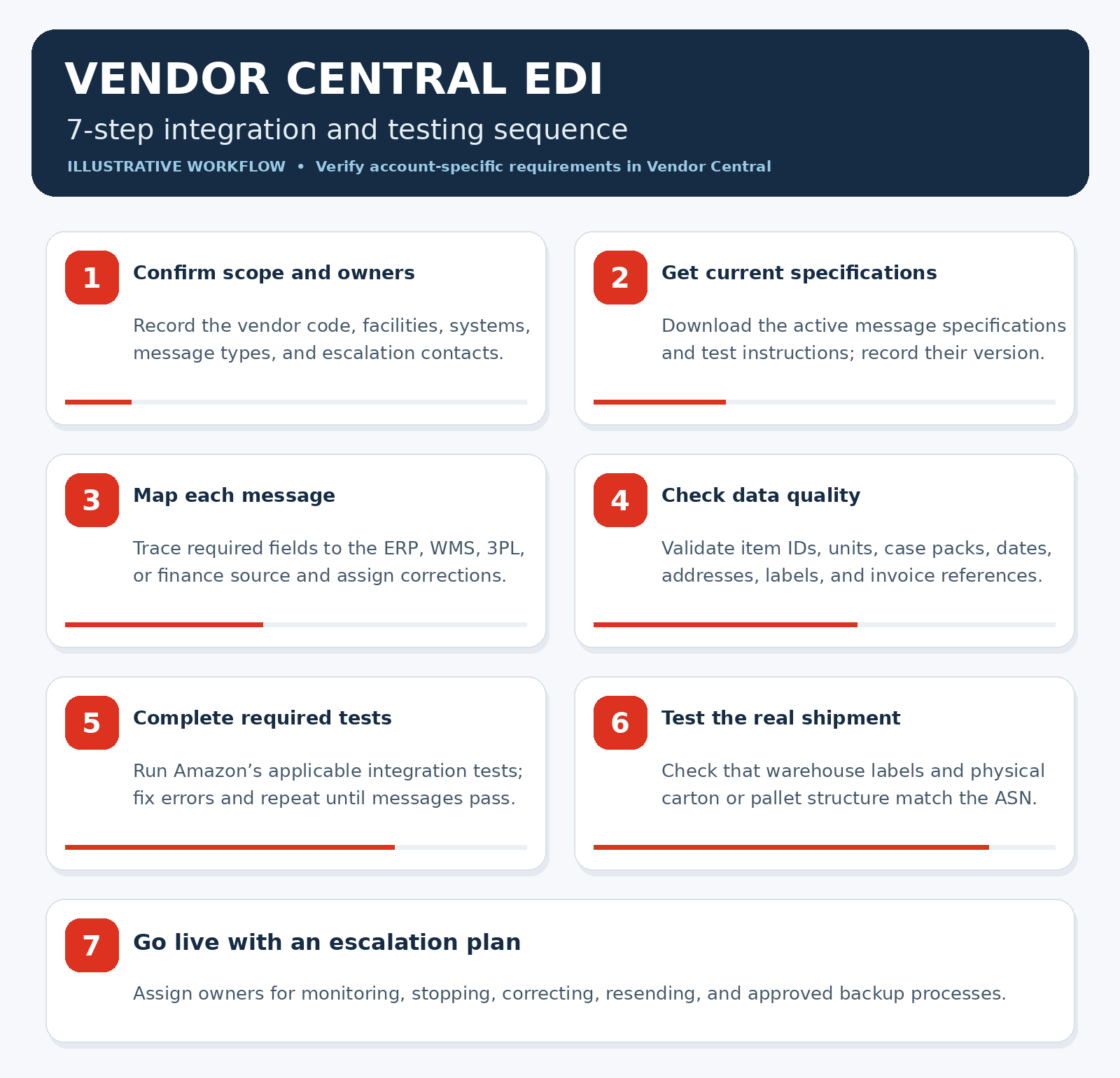
- Confirm scope and owners. List the vendor code, facilities, ERP, WMS, 3PL, messages, finance owner, and escalation contacts.
- Pull the current Amazon specifications. Download the active EDI specifications and testing instructions from Vendor Central. Record the version and date.
- Map source data to each message. Document where every required field comes from and which system owns corrections.
- Run data-quality checks before formal testing. Test item IDs, UOMs, case packs, dates, addresses, shipment hierarchy, labels, and invoice references.
- Complete Amazon’s required integration tests. Fix structural and business-rule errors, then repeat the tests until the required messages pass.
- Test the physical workflow. Ask the warehouse or 3PL to create a sample shipment. Confirm that the physical labels and shipment structure match the ASN.
- Go live with an escalation plan. Decide who can stop a transmission, fix source data, resend a message, or use an approved backup process.
Passing Amazon’s technical tests is only one step.
A test message can pass while the real warehouse still uses old item data, different carton logic, or an invoice process that doesn't match what IT tested.
Treat the first live orders as part of the testing process.
ASN accuracy and shipment documentation
The ASN connects your digital records with the physical shipment.
Amazon’s North American Vendor Manual explains that the ASN method and label method must work together. It also states that EDI pallet information should match the real shipment structure.
If the warehouse builds one shipment structure but the 856 reports something different, Amazon may receive incorrect information even if the EDI transmission itself worked.
| Method | Current guidance | What it means for your team |
|---|---|---|
| SSCC License Plate | SSCC can be used with Vendor Central, EDI 856, or the Shipments API. The manual describes SSCC as a preferred license-plate method. | Your WMS or 3PL needs unique, scannable labels, and the ASN must use matching container references. |
| AMZNCC License Plate | AMZNCC is created through Vendor Central and cannot be sent through EDI. The current table also says it cannot be used with EDI/API. | Do not build an EDI 856 process around AMZNCC labels. Use a supported label and transmission combination. |
| EDI 856 ASN | The company must first complete Amazon EDI integration and testing. The current manual points vendors to Integration > EDI Integration for setup. | Use the live Vendor Central specifications and tests as the main source for 856 implementation. |
| Physical hierarchy | Pallet information sent through EDI should match the real shipment structure, including the tare level where required. | Warehouse packing, pallet building, label printing, and EDI mapping must follow the same structure. |
The public manual available on 16 September 2026 also explains that the choice between SSCC and AMZNCC affects how you can send the ASN.
Check the latest manual inside Vendor Central before changing a live workflow. Amazon requirements can vary by network, program, and account.
If your main problem is receiving shortages or shipment differences, see the Vendor Central shortage claims guide.
Go-live monitoring and exception ownership
After EDI goes live, you need to watch whether the process continues to work correctly.
Don't start with random industry targets. Start with your own performance level and track signals that show where bad data or manual work enters the process.
Track:
- Transaction acceptance and rejection by message type and reason.
- PO acknowledgment timing when using the 855.
- ASN timing, acceptance, and shipment accuracy.
- Invoice first-pass acceptance and rejection reasons.
- Open exceptions and how long they stay unresolved.
- Shortage or chargeback dollars only when the problem can be connected to an EDI or shipment-data error.
| Problem | Main owner | Escalation | Possible result |
|---|---|---|---|
| PO import or mapping error | IT / integration | ERP owner + operations | Wrong quantities, missing lines, bad UOM, or incorrect dates. |
| 855 business-rule mismatch | Operations / planning | IT + account owner | Amazon receives a response that does not match what the business can actually fulfill. |
| 856 rejection or hierarchy mismatch | Warehouse / WMS / 3PL | Integration + Vendor Central owner | Receiving delay, shipment mismatch, shortage risk, or compliance issues. |
| 810 rejection | Finance / AR | ERP/integration + operations | Payment delay, rework, or unresolved billing differences. |
| Repeated mismatch across messages | EDI program owner | IT + operations + 3PL + AR leadership | The same problem continues across many orders until the source issue is fixed. |
The most important part is not just having a dashboard.
Every error should have one main owner, a clear next step, and enough information to identify the cause.
The problem may come from Amazon data, internal mapping, warehouse work, the 3PL, or finance.
Your team needs to know which one.
How EDI errors connect to shortages and chargebacks
EDI problems can contribute to shortages, Vendor Central chargebacks, receiving issues, and invoice problems.
But not every deduction is caused by EDI.
The better question is whether a specific EDI or shipment error changed the information Amazon used to process the order.
For example:
- The ASN quantity does not match the cartons shipped.
- A container reference is missing or incorrect.
- A UOM mapping problem changes the shipped quantity.
- The invoice contains information that does not match the PO or shipment.
These are examples of possible root causes. They are not a complete list of chargeback types.
For detailed deduction and dispute information, use the Amazon Vendor Central chargebacks guide.
For receiving shortages and PQV-related problems, use the Vendor Central shortage claims guide.
The EDI team should focus on fixing the root cause so it doesn't happen again on the next order.
Self-managed EDI vs middleware/provider vs SalesDuo
The right setup depends on what your team can manage.
No single provider or ownership model works for every business.
A company with a strong internal IT and operations team may manage EDI successfully in-house.
A company with several 3PLs, old ERP systems, repeated errors, or unclear ownership may need more outside support.
| Area | Self-managed | Middleware/provider | Managed Amazon support |
|---|---|---|---|
| Internal EDI expertise | Works when IT can maintain mappings, testing, and monitoring. | Helpful when you need translation, connectivity, or ready-made trading-partner support. | Helpful when the problem also includes Amazon workflows and team ownership. |
| ERP/WMS complexity | Works best when systems and source data are clear. | Can reduce custom mapping and transmission work. | Helps when ERP/WMS changes affect Vendor Central, warehouse, and finance together. |
| 3PL or warehouse coordination | Requires strong internal SOP ownership. | The provider may handle data movement but not physical warehouse work. | Can connect technical errors with 3PL or warehouse issues. |
| Exception monitoring | Internal teams manage alerts, corrections, and resubmissions. | Often gives transaction visibility and technical support. | Can combine EDI monitoring with operational root-cause work. |
| Best next step | Build an ownership map and confirm the team can maintain it. | Compare provider capabilities. | Use when repeated Amazon-specific errors are caused by poor cross-team ownership. |
If you are comparing different EDI platforms, use the EDI providers for eCommerce page.
If your main need is Amazon-specific setup, monitoring, and team coordination, review SalesDuo Amazon EDI automation after you identify the gaps in your current process.
Amazon Vendor Central EDI implementation checklist
Use this checklist before going live or when reviewing an existing setup.
- Confirm the account, vendor code, marketplace, program, and active EDI messages.
- Download the current Vendor Central specifications and testing instructions.
- Decide which system controls PO, item, UOM, case-pack, shipment, label, and invoice information.
- Clean item IDs, UOMs, case packs, ship-from locations, and other important master data.
- Map every message to its source fields, validation rules, owner, and correction process.
- Test the 850, 855, 856, and 810 messages that actually apply to your account.
- Compare the real warehouse carton and pallet structure with the ASN structure.
- Complete Amazon’s required integration testing.
- Record the production approval or go-live process used by the current account.
- Monitor message acceptance, ASN quality, invoice acceptance, and exception aging.
- Assign one owner for problems that involve IT, operations, the 3PL, finance, and Vendor Central.
- Connect shortage or chargeback issues to actual evidence before assuming EDI caused them.
- Review mappings and Amazon specifications regularly so changes do not break the process.
If your team cannot identify one clear owner across Vendor Central, ERP/WMS, the 3PL, and finance, the problem may be bigger than one EDI mapping.
It may require a wider review of how the process is managed.
Book your 1:1 Growth Call to review your current workflow, exception points, and the level of support your team needs.
Frequently Asked Questions About Amazon Vendor Central EDI
What is Amazon Vendor Central EDI?
Amazon Vendor Central EDI is a structured way for Amazon and a 1P vendor to exchange business documents automatically.
It can support purchase orders, acknowledgments, shipment notices, invoices, and other operational messages.
The exact messages and rules depend on the Vendor Central account, so the current account specifications should guide the setup.
Which EDI documents does Amazon Vendor Central use?
A common Vendor Central EDI flow includes the X12 850 purchase order, 855 purchase-order acknowledgment, 856 advance shipment notice, and 810 invoice.
Other messages may also apply depending on the program or account.
Always check the current Vendor Central message dashboard and specification package before assuming every vendor uses the same documents.
How do I set up EDI in Vendor Central?
Start in the current EDI Integration area for your vendor code.
Download the active specifications and test instructions. Then map the required fields to your ERP, WMS, middleware, or other systems.
Complete Amazon’s required tests, test the real warehouse process, and then go live with monitoring and a clear escalation process.
What is the difference between EDI and API for Amazon vendors?
EDI and API are two different ways systems can exchange data.
The better option depends on the Amazon workflow and your internal systems.
Do not think of the difference only as “batch versus real time.”
For ASNs, Amazon’s current North American Vendor Manual lists both EDI X12 856 and API as automation options, with separate setup paths in Vendor Central.
How does an EDI 856 ASN affect Amazon receiving?
The 856 tells Amazon what is being shipped and how the shipment is organized.
Amazon’s current North American Vendor Manual says that EDI pallet information should match the physical shipment.
If the labels, carton or pallet structure, quantities, or references are different, Amazon receiving may start with incorrect information.
Can EDI errors cause Amazon Vendor Central chargebacks or shortage claims?
Yes, EDI errors can contribute to chargebacks or shortage claims, but they are not responsible for every deduction.
Possible causes include incorrect ASN quantities, missing container references, incorrect UOM mapping, or invoice data that doesn't match the PO and shipment.
Always trace the deduction back to evidence before deciding EDI caused it.
Should we use an EDI provider or manage it in-house?
Manage EDI internally if your team can handle Amazon specifications, mapping, testing, monitoring, warehouse coordination, and exception resolution.
Use middleware or an EDI provider when connectivity or document translation is the main problem.
Managed Amazon support may be more useful when the bigger issue is ownership across Vendor Central, ERP/WMS, the 3PL, and finance.
How do we know our Vendor Central EDI setup is working after go-live?
Track transaction acceptance and rejection, PO acknowledgment timing when applicable, ASN timing and accuracy, invoice first-pass acceptance, and open exception aging.
Connect shortages or chargebacks to EDI only after confirming the root cause.
Compare performance against your own past results instead of using the same target for every Vendor Central account.
About the Author
Meet Arjun Narayan, a Business Dynamo with two decades of conquering boardrooms and founding two companies that didn't just survive but thrived. When he's not navigating business strategies and delivery teams, you'll find him immersed in his love for cars and exploring new models, geeking out over tech trends, globe-trotting for new adventures, and occasionally pondering the mysteries of the universe over a good cup of coffee.
