
Amazon EDI 856 (ASN) Compliance: How to Prevent ASN Chargebacks

An Amazon EDI 856 ASN lets Vendor Central know what a supplier is shipping. If the notice is late, missing, or doesn’t match purchase orders, carrier references, labels, or the actual cartons, the risk of chargebacks goes up. Make sure to review the final shipment data, check the transmission status and Amazon processing notices, and keep records before the fulfillment center gets the shipment.
To avoid any avoidable ASN chargebacks, check the final shipment details prior to sending the file. Confirm with Amazon that they have processed it and keep all records until the shipment is received.
For US 1P vendors, getting the file sent is only the first step.
Amazon's North American Vendor Manual states that the Shipment Notice must be sent after the carrier has loaded the goods and prior to their arrival at the FC.
Always adhere to the most up-to-date instructions in Vendor Central regarding your vendor code and program.
Scope: This guide focuses on US Amazon Vendor Central retail replenishment shipments. Direct Fulfillment, Seller Central FBA, other marketplaces, and account-specific shipping programs may use different procedures. Use the instructions applicable to your program and vendor code.
What Amazon Expects From an EDI 856 ASN
An Advance Shipment Notification (ASN) is simply a notice to say what the supplier is shipping.
EDI 856 is the X12 electronic document used to transmit that information.
In a typical retail EDI process:
- EDI 850: Purchase order
- EDI 855: Purchase order acknowledgment
- EDI 856: Advance shipment notice
- EDI 810: Invoice
For setup instructions, see the Amazon EDI setup and testing guide.
An EDI 856 breaks down the shipment information into different levels.
Shipment details will tell you what the load is and who the carrier is. Order details will link the shipment to the purchase orders. Tare details will tell you what the pallets are, and package details will tell you what the cartons are. Item details will tell you what the items are, how many of them, and what the required dates are.
This structure must be that of the actual shipment.
Amazon’s manual describes three common structures:
- SOPI: Shipment → Order → Package → Item
- SOTI: Shipment → Order → Tare → Item
- SOTPI: Shipment → Order → Tare → Package → Item
Amazon’s public hierarchy table links SOPI to small-parcel shipments and certain floor-loaded shipments. For palletized FTL or LTL shipments, you may need SOTI or SOTPI, depending on how the labels are set up.
SOTPI is required for the multi-PO pallet scenario described in the manual. Choose the hierarchy from the actual freight and label configuration, not simply from the fact that a shipment contains pallets.
If a pallet contains goods from more than one purchase order, then every carton must be traceable to the correct order.
Key checks are: Shipment ID, shipping date, destination, carrier details, PO numbers, actual carton and pallet counts, item IDs, quantities and units of measure.
Other information may be required depending on the shipment and product (SSCC labels, PRO, BOL, ARN, seals, lot numbers, expiry/manufacture dates, etc.).
For the wider requirements, see the Vendor Central EDI requirements checklist.
Amazon's public manual describes three ways to submit an ASN: through Vendor Central's shipment interface, using an EDI 856, or through the applicable Shipments API.
These methods are not interchangeable. The selected method must be compatible with the shipment's carton and pallet labels. Confirm the supported combination in the current Vendor Central requirements before choosing a label format or ASN hierarchy.
Always check the current spec for your vendor code.
Which requirements govern your shipment? Use the current Vendor Central EDI 856 implementation specification, applicable North American Vendor Manual, label requirements, and Retail 856 Troubleshooting Guide for your vendor code and shipping program.
The public examples in this article explain common controls. They do not replace your account's requirements for shipment fields, ASN hierarchy, labels, acceptance checks, or corrections.
Six Preventable ASN Failures That Cause Chargebacks
When an ASN problem arises, locate where the error originated.
The following six issues illustrate what to check, who is responsible for the issue, and what records to maintain.
1. Missing or Late ASN
A missing or late ASN may be due to the timing of the transmission or a processing issue.
Compare the actual load and departure times against the ASN send time and Amazon's processing status.
Don't just rely on the planned pickup time.
2. Incorrect Shipment or Carrier Identifiers
One incorrect identifier can cause issues even if the shipment details are otherwise correct.
For instance, an error could be caused by a reused shipment ID, an incorrect Standard Carrier Alpha Code (SCAC), or an ARN being linked to the wrong purchase orders.
Assign an owner for each identifier to a specific team.
Amazon's manual details how to check the ARN-to-PO assignment when an invalid ARN notice is presented.
3. Incorrect Carton or Product Quantities
Quantity errors tend to start off during packing.
For example, one case containing 12 individual units is not the same as 12 cases. If the WMS sends the wrong unit of measure or converts cases to individual units incorrectly, the EDI 856 may report quantities that differ from what was packed.
Compare the confirmed purchase order, final packing record, item identifiers, case quantities, and unit-of-measure mapping before correcting the ASN.
Check the purchase order quantities and unit conversions prior to changing the EDI output.
4. SSCC Label and Shipment Structure Mismatch
Shipping labels and ASN records must be in agreement as to the cartons and pallets.
For example, you couldn't report a pallet containing two labeled cartons as a single item-level pallet if the required labeling method required separate package IDs.
Every SSCC must identify the correct physical carton or pallet.
5. Missing Lot or Date Information
Lot numbers and dates are required for certain products and programs
When they apply, check the scanned expiration dates, manufacture dates, or lot numbers against the product specs and the ASN.
Don't just leave them out because they aren't required on every consignment.
6. File Sent Successfully but Not Accepted for Business Processing
A successful file transfer doesn't mean the ASN is correct.
A transport receipt indicates that a delivery was made at the connection layer. X12 997 or 999 Is a functional acknowledgment that is supposed to prove that an EDI message passed a set of technical checks, if available.
Neither response means that Amazon has accepted all shipment data for business processing or that the physical cartons and labels match the ASN. Check the processing notices, errors, and shipment status for your vendor code before you close the transaction.
It doesn't prove the shipping details, quantities, or labeling are correct.
Check Amazon's later processing notices for any errors or outstanding records.
The EDI 856 Compliance Workflow Before, During, and After Pickup
Follow the actual shipping process and keep records at each stage.
Assign one person to each check so that problems can be dealt with prior to them becoming chargebacks.
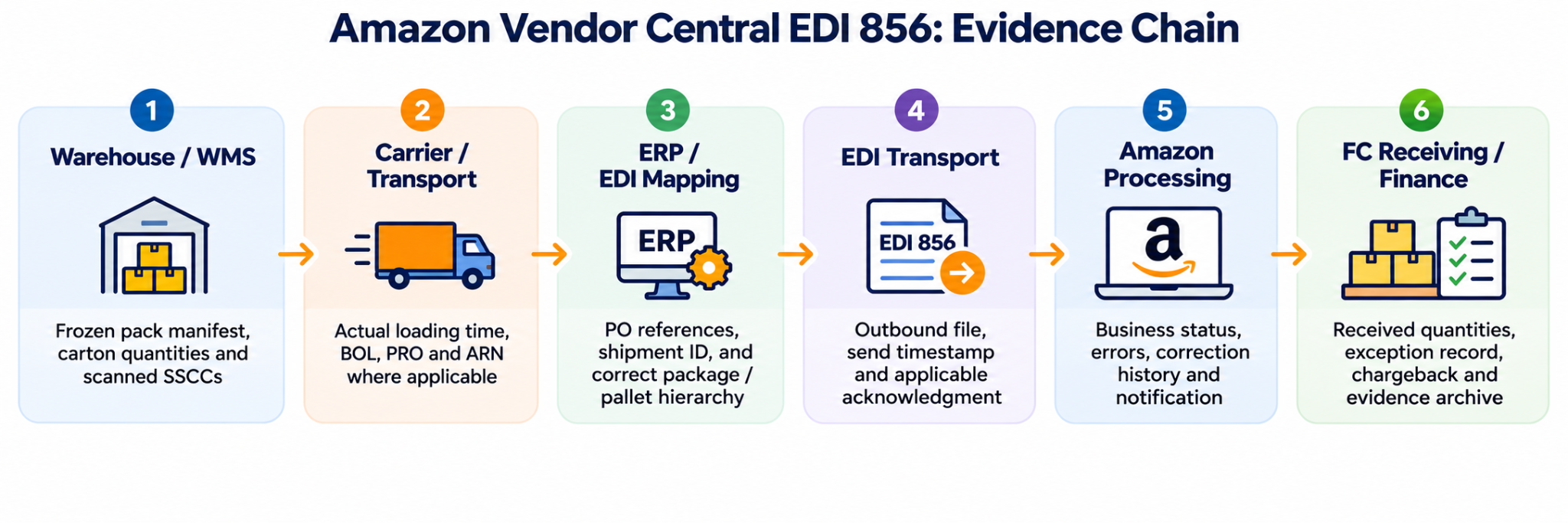
Before Loading: Confirm the Final Packed Shipment
Start with the purchase order (confirmed) and the final WMS packing records.
Compare:
- Item IDs
- Case pack quantities
- Units of measure
- Carton and pallet counts
- Shipping destination
- SSCC carton and pallet labels
Scan the sample labels and compare them with the packing records.
The warehouse is responsible for accurate packing. The EDI team is responsible for mapping that information into the correct document structure.
If the cartons are being repacked or products from a number of purchase orders are being combined, then update the final packing list prior to creating the ASN.
Use one of the approved final packing records as the source.
At Pickup: Record the Actual Shipping Information
Collect the carrier details and applicable shipment references, including:
- Carrier and service type
- Bill of lading (BOL)
- Progressive rotating order number (PRO)
- Amazon reference number (ARN), where required
Check the destination fulfillment center, the shipment load, and the purchase orders.
ARN information is of particular relevance when it comes to collect/WePay routing. It should not be treated as a mandatory field for every prepaid shipment.
Use the actual loading and pickup event to kick off ASN preparation.
For the U.S. retail replenishment process as described in Amazon's manual, you send the correct ASN after you've loaded and before the shipment gets to the FC.
Check Vendor Central for any more stringent account requirements.
After Transmission: Confirm Amazon Can Process the ASN
Track three separate stages:
- File transferred: The EDI file has been sent.
- Technical response received: The relevant system has acknowledged the file.
- Amazon processing result: Amazon's business system has processed the shipment notification.
Review the rejected or pending records and any alerts that have been sent to the Vendor Central EDI contacts.
Set follow-up deadlines in line with the expected date of arrival of the shipment.
If a correction is required, then check the current Retail 856 Troubleshooting Guide and your vendor code instructions prior to replacing or resending the file.
Keep the original ASN ID, any permitted revised ID, file versions, and timestamps.
Sending the file again without checking the rules could end up with duplicate notices.
Prior to the truck arriving, compare the final EDI 856 with the BOL, packing list, printed labels, and carrier records.
When you see an issue, tag it as open, fixed, or escalated, and make sure someone owns it.
Inform Finance about any ASN Exceptions that are still not resolved, that have receiving impact or can cause deductions. Maintain the shipment ID, affected PO numbers, attached files, carrier evidence, exception status, and owner together so the team can investigate the back charges later on.
Once Amazon has received the consignment, save the receiving notice and any chargeback with the consignment records.
Track the recurring problems to find the root cause.
If Amazon issues a deduction, preserve the shipment and EDI evidence and determine the specific violation category before deciding whether a dispute is appropriate.
For evidence requirements and dispute handling, see SalesDuo's Amazon Vendor Central chargeback guide.
This whole shipment process is intended to prevent future errors.
Pre-Dispatch and Post-Send Checklist
Before loading
- Please check that the correct PO numbers, item IDs, units of measure, final packing quantities, carton or pallet counts, and SSCC labels are used.
- Make sure the way pallets and cartons are arranged matches the required ASN hierarchy.
- Record the approved shipment and destination references.
After loading and carrier handoff
- Record the actual loading or departure event.
- Confirm the carrier, PRO, BOL, ARN, and other identifiers required for the shipment.
- Transmit the accurate ASN within the applicable Amazon requirements.
After transmission and before receipt
- Check the transmission log, applicable technical acknowledgment, and Amazon processing status.
- Investigate open or rejected records and follow the authorized correction process.
- Preserve file versions, timestamps, labels, packing records, and carrier evidence.
After receipt
- Reconcile receiving information and any exception or chargeback.
- Assign unresolved issues to a named owner and record the next action.
Every unresolved problem should have a named person responsible for follow-up.
Troubleshooting a Rejected, Late, or Inaccurate EDI 856
Start by identifying whether the problem is with technical delivery, Amazon’s processing, or the physical shipment.
Each type of problem needs a different check.
Step 1: Check Technical Delivery
If the EDI or IT team has generated the file, they must confirm that it was sent to the correct trading partner. If you can, request a technical acknowledgment. If there is any formatting error detected by the system, forward this information to the EDI mapping group.
Keep the original file, mapping version, and error response.
Step 2: Check Amazon’s Processing Status
The Vendor Central operations team should confirm that Amazon connected the ASN to the correct shipment.
Check purchase orders, routing references, and the required labeling method.
Use Amazon’s actual processing error to investigate the problem.
Do not rely only on a 997/999 technical acknowledgment.
Step 3: Compare the Physical Shipment With the Records
The warehouse or 3PL should check actual cartons, scanned SSCC labels, pallet layout, and the signed BOL.
The ERP team should confirm purchase order quantities and product master data.
Fix incorrect source information before asking the EDI team to rebuild the file.
Example: One Pallet With Multiple Purchase Orders
Picture this: A 3PL needs to pack cartons of PO-A and PO-B together on one single pallet. Although the WMS monitors every single carton, the EDI mapping system issues a single pallet-level item group and does not link which cartons of the planogram are associated with which purchase order.
Even if the physical labels are correct, the EDI 856 does not give an accurate description of the shipment.
To fix the problem:
- The 3PL confirms the final packing records.
- The ERP team checks which purchase order owns each carton.
- The EDI team checks the shipment's required hierarchy against the current Amazon specification. For the multi-PO pallet described in the public North American Vendor Manual, SOTPI is required.
- Vendor Central operations confirms the permitted correction or replacement process before any revised ASN is transmitted.
- The team keeps both file versions and processing timestamps.
This is a fictional example of how to handle the problem, not a SalesDuo client result.
Contact Vendor Central support when Amazon’s processing notice does not match the current requirements or the correction process is unclear.
Contact the carrier when the disagreement involves the BOL, PRO, pickup time, appointment, or delivery reference.
Do not assume the same correction method works for every account.
When to Automate ASN Checks Instead of Fixing Each Error Manually
Automation may be worth considering when the same ASN problem keeps returning after manual fixes.
This is especially relevant when shipments move through several warehouses or third-party logistics (3PL) providers.
Manual mapping and missing acknowledgments can also make errors harder to investigate.
An internal team may be able to manage the process if responsibilities for packing records, EDI mapping, monitoring, and problem resolution are clearly assigned.
A managed integration provider may be useful when the work involves several systems and teams, including:
- Enterprise resource planning (ERP)
- Warehouse management systems (WMS)
- Label printing
- Carriers
- Vendor Central
When comparing providers, look at how they check shipment information, match SSCC labels, send alerts, handle retries, and keep evidence.
Do not judge an EDI service only by whether it can transmit files.
If repeated ASN errors involve warehouse data, mapping, acknowledgments, and exception ownership, review SalesDuo's Amazon EDI automation services to understand which integrations, validation controls, monitoring tasks, and support responsibilities may be included.
Before choosing a provider, confirm which systems, data fields, warehouses, and support tasks are included.
Automation cannot correct cartons that were packed incorrectly or guarantee zero chargebacks.
Compare the number of confirmed ASN defects, repeat error categories, investigation time, correction effort, and verified deductions over a consistent reporting period.
Estimate the cost of the proposed automated controls, including implementation, testing, monitoring, support, and ongoing maintenance. Count only costs and improvements supported by the relevant shipment and finance records; disputed charges are not automatically recoverable or avoidable savings.
A disputed chargeback should not automatically be counted as money that could have been saved.
Reduce Repeated ASN Errors with Clear Ownership
Repeated EDI 856 issues often involve more than one team. Warehouse processes, shipment data, EDI mapping, transmission status, and Amazon processing all need to align.
Assign clear ownership for each step, keep shipment records consistent, and review both operational and technical evidence before deciding where the failure occurred.
If repeated EDI 856 problems involve both warehouse and integration teams, Book Your 1:1 Growth Call with SalesDuo to discuss how better checks and clear responsibilities may help.
Frequently Asked Questions about Amazon EDI ASN
Can an EDI 856 Be Accepted Even When the ASN Is Wrong?
Yes, a file can be transferred or technically acknowledged even when shipment IDs, quantities, labels, or carton structure are incorrect.
Check Amazon’s processing notices and compare the ASN with the actual shipment.
Successful file delivery does not prove accurate receiving information.
When Must Amazon Receive an ASN for a Vendor Central Shipment?
Amazon’s public North American Vendor Manual states that an accurate ASN should be sent after the shipment is loaded and before it reaches the fulfillment center.
This includes small-parcel shipments.
Before shipping, confirm the latest requirements for your vendor code and program.
What Is the Difference Between ASN Accuracy and Carton-Content or Label Chargebacks?
ASN Accuracy problems involve missing, late, or incorrect shipment information.
Carton-content and labeling problems involve the physical cartons and labels used during receiving.
One SSCC mismatch may cause more than one type of issue.
Check the exact violation category before investigating.
Can I Use AMZNCC Labels With an EDI 856?
Under the publicly available North American Vendor Manual's ASN/label compatibility guidance, AMZNCC labels are associated with the Vendor Central shipment-submission method, not the EDI 856 submission method.
For EDI 856 shipments, use a supported label type and ASN hierarchy that match the shipment configuration. Confirm the currently approved combination for your vendor code before changing labels or transmission methods.
Which Data Changes Require a Corrected ASN?
Review any change that makes the ASN different from the actual shipment.
This may include:
- Carton quantities
- Packed items
- SSCC assignments
- Shipment identifiers
- Carrier references
- Required product dates
Correction rules depend on your account and shipment status.
Keep the original and revised records as evidence.
Where Should I Look First When Amazon Says There Was No ASN?
Check the carrier loading time, EDI 856 file, transmission log, technical response, and Amazon processing notice. Confirm shipment ID, purchase order, destination, and vendor details match the shipping documents before involving EDI and Vendor Central teams.
About the Author
Meet Aryan Suyal, an SEO Content Writer Intern at SalesDuo who excels at turning patterns into precise, on-point content. He brings sharp insights and analytical thinking, along with a builder's instinct for creating systems that help ideas work smarter. Outside of work, you'll find him getting lost in books, tinkering with and building AI systems, or losing hours to a good documentary.