
How to Increase Traffic to Your Amazon Store in 2026

Low traffic on Amazon usually means something is not working properly. Before you spend more money on ads or try other ways to bring in shoppers, check the basics first. See if customers can easily find your product listing. Make sure your ads are reaching people who are likely to buy. Check that your Brand Store is simple to use and easy to move through. You should also confirm that your tracking is working correctly and showing the right data.
To get more page views on Amazon, start by fixing the first problem in the customer journey. This could be listing eligibility, organic discovery, paid reach, click-through rate, Store navigation, external traffic quality, or measurement.
In this guide, we’ll give you a practical Amazon traffic audit so you can find the real bottleneck and decide what to test first.
Quick Answer: Why Amazon Traffic Stays Low
Amazon traffic may stay low if shoppers cannot easily find your listing. It can also happen when your organic ranking is weak, your ads reach too few people, your Brand Store is difficult to browse, or you do not track outside traffic correctly.
Use the table below to find the issue you are seeing and the first step you should take.
Observed signalLikely bottleneckWhat to checkFirst actionNo impressions or organic discoveryEligibility, indexing, relevance, category, or inventoryListing status, indexing, search placement, inventoryFix discoverability before spending moreImpressions but few clicksRelevance, CTR, or offer presentationSearch-query, ad, and listing CTRTest relevance and search-result appealSessions but weak ordersConversion, offer, or detail-page problemSessions, Unit Session Percentage, price, reviews, and contentRun a listing and offer auditAds receive limited impressionsTargeting, budget, bids, eligibility, or competitionCampaign delivery, targeting, placements, and budgetsDiagnose paid reach before increasing spendStore visitors do not engage with productsNavigation, merchandising, or landing-path problemStore visitors, views, entry pages, and product clicksImprove Store paths and destination relevanceExternal clicks cannot be linked to resultsMeasurement gapAttribution tags, Store source tags, and campaign namingAdd tracking before scaling
The diagnostic sequence is eligibility, organic discovery, paid reach, Store navigation, and measurement. Work through these stages in order and fix the first confirmed problem before adding another traffic source.
For broader discovery planning, see how to increase visibility on Amazon.
Define Amazon Traffic Before You Diagnose It
Amazon traffic isn’t just one number. It can mean ad impressions, ad clicks, product page views, sessions, Brand Store visitors, Store views, or activity from an outside campaign.
Each of these metrics tells you something different.
MetricWhat it tells youWhere to checkAd impressionsHow often an ad was displayedAmazon Ads campaign reportsAd clicksHow often shoppers clicked an adAmazon Ads campaign reportsClick-through rateThe percentage of impressions that generated clicksAmazon Ads reportsDetail-page viewsVisits to a product detail page within the report’s attribution contextAmazon Ads or Amazon AttributionSessionsShopper visits to an ASIN during a selected periodDetail Page Sales and Traffic reportsPage viewsTotal product-page views, including repeat viewsDetail Page Sales and Traffic reportsUnit Session PercentageUnits purchased compared with sessions under Amazon’s report definitionDetail Page Sales and Traffic reportsStore visitorsVisitors who reached the Brand StoreStores InsightsStore viewsQualifying views of Store pagesStores InsightsAttributed activityAmazon activity connected to tagged non-Amazon marketingAmazon Attribution
Methodology: SalesDuo’s framework organizes current Seller Central, Amazon Ads, Stores Insights, and Amazon Attribution signals into funnel order. It is a diagnostic workflow, not an official Amazon benchmark.
A campaign might get more clicks but not enough product-page activity. Your Brand Store could see more visitors, but engagement might still be low. A listing can also get more sessions, but conversions may drop.
So, always review traffic along with destination quality, source relevance, conversion rates, and unit economics.
Report names, fields, and access can change depending on your account type, program eligibility, marketplace, and Seller Central interface. Check the current Amazon.com labels in your account before using this framework.
For a wider reporting process beyond traffic diagnosis, use SalesDuo’s guide to Amazon sales data analysis.
Follow the Discovery-to-Purchase Chain
Amazon traffic should be diagnosed as a sequence:
Search or ad impression → click → detail-page view or session → add to cart → purchase
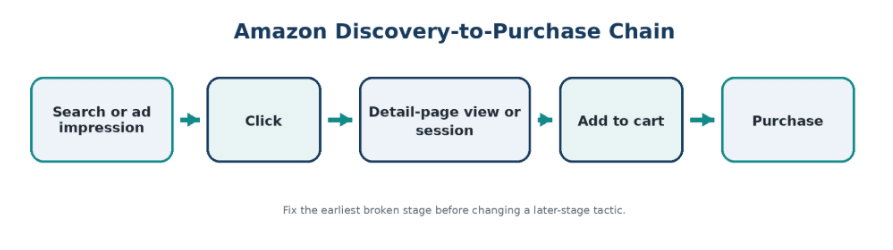
A problem at an early stage affects everything that follows.
For example:
- Low impressions usually point to discoverability or ad-delivery issues.
- Healthy impressions with few clicks usually point to relevance or click appeal.
- Healthy sessions with weak orders usually point to the offer, product page, or audience quality.
- Strong traffic without clear source data usually points to a measurement problem.
The 10-Minute Amazon Traffic Diagnostic Scorecard
Use this scorecard to spot the first stage that needs your attention.
Give each stage one of these scores:
- 2 points: No clear problem found
- 1 point: Possible weakness or incomplete evidence
- 0 points: Confirmed problem or missing measurement
StageQuestions to answerEvidence to reviewWhat a low score means1. EligibilityIs the listing active, searchable, available, correctly categorized, and purchasable?Listing status, suppression notices, indexing, inventory, Featured Offer statusShoppers may be unable to find or buy the offer2. Organic discoveryIs the ASIN appearing for relevant searches and earning clicks?Query visibility, organic position, search-result presentation, CTR patternsRelevance, rank, category, or click appeal may be limiting traffic3. Paid reachAre campaigns eligible, delivering, and reaching suitable shoppers?Impressions, CTR, targeting, budgets, placements, and search termsAds may not be reaching enough qualified shoppers4. Destination qualityDo listing or Store visitors continue toward a purchase?Sessions, Unit Session Percentage, Store navigation, product clicks, price, reviews, and contentMore traffic may increase cost without improving sales5. Measurement and economicsCan the brand identify the source and value of traffic?Attribution tags, Store source tags, campaign naming, margin, and conversion inputsScaling would be based on incomplete information
How to Use the Scorecard
Begin with Stage 1 and go step by step. Stop when you hit the first stage that gets a zero.
Fix that stage before moving on. If a stage gets one point, gather the missing information before making big changes.
The location of the first zero matters more than your total score. Don’t focus on Store navigation if your promoted ASIN is suppressed or unavailable.
Priority rule: Fix the earliest broken stage that has enough reliable data to diagnose. Add measurement when data is missing. Increase traffic only after eligibility, relevance, destination readiness, and economics pass the readiness check.
How This Scorecard Should Be Used
This scorecard is a tool for diagnosing problems, not an official Amazon benchmark. It puts common traffic signals in funnel order so your team can tackle one bottleneck at a time.
Scores should be supported by current Seller Central, Amazon Ads, Stores Insights, and Amazon Attribution data where available.
Use the full audit: Download the Amazon Traffic Diagnostic Scorecard: 10-Minute Listing and Store Audit to check listing eligibility, organic traffic, ad reach, page quality, and tracking across your ASINs. The full scorecard should also stay available on the page, so readers do not have to download it.
Amazon Traffic Bottleneck Decision Tree
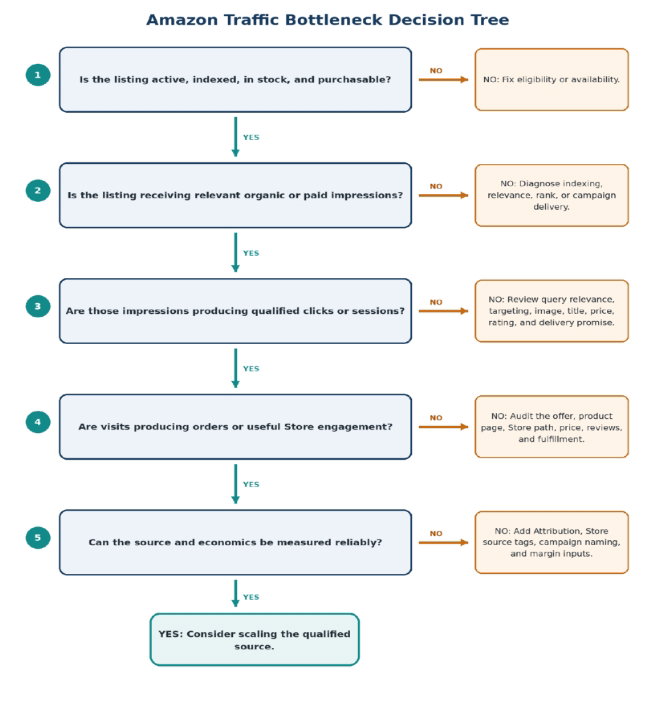
Use this order to select the next action.
- Is the listing active, indexed, in stock, and purchasable?
- No: fix eligibility or availability.
- Yes: continue.
2. Is the listing receiving relevant organic or paid impressions?
- No: diagnose indexing, relevance, rank, or campaign delivery.
- Yes: continue.
3. Are those impressions producing qualified clicks or sessions?
- No: review query relevance, targeting, image, title, price, rating, and delivery promise.
- Yes: continue.
4. Are visits producing orders or useful Store engagement?
- No: audit the offer, product page, Store path, price, reviews, and fulfillment.
- Yes: continue.
5. Can the source and economics be measured reliably?
- No: add Attribution, Store source tags, campaign naming, and margin inputs.
- Yes: consider scaling the qualified source.
Fix the first stage that fails. Don’t skip ahead just because another tactic seems easier.
Step 1: Confirm the Listing Can Be Discovered
Before trying to boost traffic, make sure shoppers can find and buy your listing. Marketing won’t fix a serious eligibility or availability issue.
Check Listing Status and Search Suppression
Confirm that the listing is active and free from search-suppression issues. Missing information, invalid attributes, image problems, or category requirements may prevent the ASIN from appearing normally.
When suppression is the problem, follow the process to fix a search-suppressed Amazon listing instead of treating it as a marketing issue.
Check Search-Term Indexing
Review whether the ASIN appears for the relevant terms it should match. Use Seller Central data, Brand Analytics where available, manual checks, and third-party tools as supporting evidence.
A listing might be active but still not show up for its most important searches.
Don’t assume that adding more keywords will solve every problem. The keyword needs to fit the product, category, attributes, title, and what shoppers are looking for.
Check Inventory and Geographic Availability
Review:
- Available inventory
- Inbound or stranded stock
- Delivery times
- Marketplace availability
- Fulfillment restrictions
- Whether the offer can be delivered to the intended U.S. shopper
Your traffic won’t stay steady if your product often goes out of stock or isn’t available in key locations.
Review Category and Variation Structure
An incorrect category can reduce relevant discovery. Variation problems may split traffic, confuse shoppers, or send them to the wrong child ASIN.
Review sessions and orders at the child-ASIN level. One child may receive most page views while another receives most purchases.
Review Featured Offer Status
Check whether the offer is eligible to appear as the Featured Offer and how consistently it holds that position.
Featured Offer status isn’t the same as traffic, but a weak or unavailable offer can make your traffic less valuable.
Confirm Current Listing Requirements
Amazon changes its listing requirements over time. Before changing titles or product content, verify the current Amazon.com category rules in Seller Central.
Don’t follow outdated advice about making titles as long as possible.
Use a Red, Yellow, and Green Check
StatusWhat it meansActionGreenThe listing is active, indexed, available, correctly categorized, and purchasableContinue to organic and paid-traffic diagnosisYellowOne or more checks are unclear, inconsistent, or changingGather evidence before increasing trafficRedThe listing is suppressed, unavailable, not indexed, or cannot support the offerFix eligibility before spending more
Fix any red-status problems before you add ads or send external traffic.
Brands that need ongoing help with listing health, catalog issues, advertising, and account performance can explore SalesDuo’s Amazon Account Management services.
Step 2: Separate a Traffic Problem From a Conversion Problem
Low sales do not always mean your listing needs more traffic. When sessions are healthy but orders remain low, the problem is more likely to be your offer, product page, or traffic quality.
Use the pattern in your reports to decide what to check first.
PatternLikely issueInvestigate firstFew or no impressionsEligibility, indexing, relevance, category, or limited ad deliveryListing status, search-term coverage, and campaign eligibilityImpressions but weak clicksWeak relevance or poor search-result appealQuery intent, main image, title, price, ratings, and delivery promiseAd clicks but limited downstream activityAd-to-page mismatch or unsuitable destinationSearch terms, placements, promoted ASIN, and landing pageHealthy sessions but weak ordersConversion or offer weaknessProduct content, reviews, price, fulfillment, and competitionStore visitors but few product clicksWeak navigation or merchandisingEntry page, product grids, page structure, and mobile layoutExternal clicks but no reliable outcome dataIncomplete measurementAttribution tags, Store source tags, and campaign naming
There is no single CTR or conversion rate that works for every product. Results can vary based on category, price, listing age, traffic source, competition, season, ad placement, and buying cycle.
Compare the same ASIN across similar periods and search terms. Use controlled before-and-after tests so you can see whether one change improved performance.
Illustrative Example
Illustrative only: The figures below are not a SalesDuo client result or a universal benchmark. They only show how the diagnosis changes as shoppers move through the funnel.
Assume an ASIN receives 100,000 impressions and 800 clicks.
CTR = clicks ÷ impressions × 100
The CTR is 0.8%, but this number alone does not explain the problem. Compare it with similar search terms, placements, time periods, and products.
Now assume those visits produce only 20 orders. Increasing the budget may bring more sessions, but it will not fix the weak conversion problem.
The diagnosis should move through two checks:
- Confirm that the search terms and search-result presentation attract suitable shoppers.
- Confirm that the offer and product page convert those shoppers.
The better next step may be to run an Amazon listing audit instead of increasing campaign spend.
When traffic is healthy, but revenue remains weak, review the wider factors that may increase Amazon sales rather than treating traffic as the only growth lever.
In a SalesDuo traffic audit, the initial assumption was that the campaign needed more budget. The funnel review showed that the promoted ASIN was already receiving relevant impressions and clicks, while the product page was producing weak downstream orders. SalesDuo therefore prioritized offer and detail-page readiness before scaling the campaign, preventing additional spend from amplifying the conversion bottleneck.
Step 3: Diagnose On-Amazon Organic Discovery
☐ Confirm the ASIN is indexed for priority buyer-intent queries.
☐ Separate indexing from ranking.
☐ Compare branded and non-branded visibility.
☐ Review query-level impressions and CTR.
☐ Check category, attributes, variation structure, offer, and search-result presentation before rewriting content.
When checking organic performance, see if your ASIN is indexed, visible, relevant, and appealing enough to get qualified clicks.
Separate Indexing From Ranking
Indexing tells you whether Amazon recognizes the ASIN as relevant to a search.
Ranking tells you where the product appears for that search.
A product might be indexed but still rank too low to get real page views. It can also show up for broad searches that get impressions but not many qualified clicks.
Review Search-Query Patterns
Look for three patterns:
- Important buyer-intent searches where the ASIN does not appear
- Relevant searches where the ASIN appears too low
- Searches that create impressions but few clicks
Organic signalPossible explanationFirst checkNo visibility for a relevant queryIndexing, relevance, category, or attribute problemSearch-term relevance and listing dataVisibility only at low positionsLimited organic strength or strong competitionRank trend, sales history, offer, and categoryImpressions but low CTRWeak search-result appeal or poor intent fitImage, title, price, rating, delivery, and queryTraffic is concentrated on one child ASINVariation presentation or demand differencesChild-level sessions and ordersBranded terms perform, but generic terms do notLimited non-brand discoveryGeneric keyword relevance and category presence
Also, compare how your product does with branded versus non-branded searches. If you get lots of branded traffic but little generic discovery, your product may rely too much on existing brand demand and not reach enough new shoppers.
Review Search-Result Appeal
Before opening the product page, shoppers may see:
- Main image
- Product title
- Price
- Rating and review count
- Coupon or promotional badge
- Pack size
- Variation information
- Prime eligibility
- Delivery promise
These elements should earn relevant clicks, not simply the highest possible click volume.
When organic visibility is the confirmed problem, read how to increase visibility on Amazon or review SalesDuo’s Amazon SEO services.
Step 4: Diagnose Paid Reach and Traffic Quality
If your Amazon Ads aren’t getting much traffic, it doesn’t always mean your budget is too low. Check campaign eligibility, impressions, targeting, CTR, destination quality, and conversion before spending more.
Paid signalQuestionPossible problemCampaign is inactive or ineligibleCan the campaign deliver?Status, product eligibility, policy, or inventoryFew impressionsIs the ad entering enough relevant auctions?Targeting, relevance, bids, budget, or competitionImpressions but weak CTRDoes the ad match the search and offer?Search-term mismatch, image, title, price, or ratingClicks but weak detail-page activityDoes the destination match the ad?Wrong ASIN, unsuitable Store page, or weak continuitySessions but weak ordersIs the destination ready to convert?Listing, offer, fulfillment, reviews, or audience qualitySales but weak contributionIs the traffic economically sustainable?CPC, conversion, margin, refunds, and product mix
Check Campaign Eligibility First
A campaign may receive limited traffic when:
- The ASIN is unavailable
- The listing is ineligible
- The campaign is paused
- The budget is exhausted
- Targeting is too narrow
- Bids are not competitive
- Featured Offer eligibility has been lost
Fix delivery problems before making bigger changes to your campaigns.
Review Search Terms and Product Targets
Do not judge paid traffic only by total clicks.
Identify:
- Which queries generated clicks
- Whether those queries match the product
- Which placements generated traffic
- Whether clicks went to the intended ASIN
- Whether the detail page supports the same promise as the ad
Even a high-volume search term can be a bad source if it brings in shoppers with the wrong expectations.
Check Ad-to-Page Continuity
The destination should support the promise made by the ad.
When an ad focuses on a material, feature, use case, pack size, or audience, the shopper should be able to confirm that information quickly on the product page.
Only add more budget if you know budget is the real limit and the later steps in your funnel are working well.
When paid reach is the main bottleneck, review the account with SalesDuo’s Amazon advertising audit and management team.
Need a second set of eyes? Request an Amazon traffic and listing audit to identify whether reach, relevance, destination quality, or conversion is limiting growth.
Step 5: Diagnose Brand Store Traffic and Navigation
Brand Store traffic should be reviewed separately from product-page traffic.
Low Store visitors usually point to an acquisition problem. Visitors who do not move toward products usually point to navigation, merchandising, or landing-page relevance.
Store patternLikely problemNext checkFew visitorsAcquisition or Store discoverabilitySponsored Brands, organic brand links, and external tagsVisitors but few page viewsWeak entry-page relevance or navigationHero message, first-screen links, and mobile layoutSeveral views but few product clicksMerchandising or shopping-path problemProduct grids, category labels, and comparison contentOne page receives most entries but weak engagementLanding-page mismatchCampaign promise compared with entry-page contentSource reporting is unclearIncomplete tagging or namingStore source tags and campaign structureMobile engagement is weakMobile layout or content-density problemMobile preview, image crops, navigation, and product placement
Review the Entry Page
The first Store page should match the shopper’s reason for visiting.
A campaign promoting one category should not send shoppers to a broad homepage that forces them to search again.
Review Shopping Paths
Check whether:
- Important categories are easy to find
- Product grids appear near relevant content
- The Store works well on mobile
- Navigation uses clear shopper language
- High-priority products appear early enough
- Each campaign uses a suitable landing page
For Store design and setup guidance, read how to build and optimize an Amazon Storefront.
Step 6: Decide Whether External Traffic Is Appropriate
External traffic should only be added when the listing is ready, the audience matches the product, the destination supports the campaign, results can be measured, and the economics are reasonable.
Readiness questionGoFix firstNo-go signalIs the listing active and available?No critical issuesMinor catalog issueSuppressed, unavailable, or often out of stockIs the destination ready to convert?Offer and page support the messageMinor content or offer weaknessOngoing weak conversion with no clear causeDoes the audience match the product?Clear intent matchTargeting is broad or uncertainBot, incentivized, purchased, or irrelevant trafficIs the destination appropriate?Listing or Store matches the goalPath needs testingCampaign promise does not match the destinationCan results be measured?Attribution or Store tags are readyNaming or tags are incompleteNo dependable source trackingCan the economics support acquisition?Contribution remains acceptableMargin assumptions need reviewTraffic cost cannot be justifiedAre disclosures and permissions in place?Compliance requirements are metReview is neededUndisclosed relationships or improper data useSend traffic to a product page whenSend traffic to a Brand Store whenOne ASIN is the clear campaign focusThe campaign introduces a range or brandThe audience has strong product intentShoppers need comparison or educationThe listing is ready to convertSeveral products or use cases are relevantThe campaign message directly matches the ASINA guided path is more useful than one ASIN
External traffic does not guarantee better organic rankings. Results depend on relevance, conversion, availability, competition, and Amazon’s systems.
For full channel planning, read how to drive external traffic to Amazon listings.
When Meta is the selected channel after the readiness check, use the dedicated guide to Facebook Ads for Amazon rather than expanding the campaign workflow here.
Step 7: Measure the Traffic Source Instead of Guessing
External traffic should be tracked before it is scaled. Use Amazon Attribution, Store source tags, and consistent campaign naming to understand where visitors come from and what they do.
Use Amazon Attribution
Amazon Attribution helps eligible advertisers measure how non-Amazon marketing contributes to activity on Amazon.
Use a naming format that identifies the marketplace, channel, campaign, audience, creative, destination, product group, and test version.
For the full setup process, read how to measure off-Amazon traffic with Amazon Attribution.
Use Brand Store Source Tags
When a Brand Store is the destination, use separate Brand Store source tags for different campaigns where available.
Do not use one general tag for every email, social, creator, and paid campaign. Separate tags make comparison easier.
Use the Correct Source of Truth
QuestionPrimary report or toolIs the product receiving visits?Detail Page Sales and TrafficIs the listing converting those visits?Unit Session Percentage and ordered-unit dataAre ads being shown and clicked?Amazon Ads reportsWhich searches and targets generated traffic?Search-term and targeting reportsAre shoppers using the Brand Store?Stores InsightsWhich external campaign generated Amazon activity?Amazon AttributionWhich campaign generated Store visits?Store source tagsIs the traffic profitable?Amazon data combined with verified spend and contribution margin
Attribution is not perfect. Reporting windows, delays, missing tags, returns, cross-device activity, and shoppers who interact with several campaigns can affect the results.
Use attribution to improve decisions, not to claim that every sale has one fully proven source.
Check the Economics Before Scaling Traffic
More traffic is only useful when it creates enough value to justify its cost. Use these formulas as directional planning tools, not universal benchmarks.
CalculationFormulaImportant limitationClick-through rateClicks ÷ impressions × 100Do not mix organic and advertising denominatorsListing conversionOrders or units ÷ sessions × 100Use Amazon’s exact report definitionStore views per visitorStore views ÷ Store visitorsMeasures browsing depth, not purchase intentExternal ROASAttributed sales ÷ external spendReview reporting lag, attribution window, and returnsExpected contribution per visitConversion rate × contribution margin per orderRequires accurate margin and conversion inputs
When the cost of acquiring a visit is higher than its expected contribution, scaling traffic may increase revenue while reducing profit.
Your 30-Day Amazon Traffic Improvement Plan
Run one controlled test against the earliest confirmed bottleneck. Record the baseline, change one major variable, monitor the nearest leading signal, and decide whether to keep, revise, or stop the test.
WeekActionWhat to recordWeek 1Establish the baselineListing status, impressions, clicks, sessions, page views, conversion, Store activity, source tags, inventory, price, and promotionsWeek 2Fix one confirmed bottleneckSuppression, indexing, targeting, search-result appeal, Store destination, listing readiness, or measurementWeek 3Monitor the leading signalImpressions for discovery changes, CTR for search-result changes, sessions for traffic changes, conversion for destination changesWeek 4Keep, revise, or stopKeep a working test, revise an unclear one, or stop when traffic quality, economics, compliance, or readiness is weak
Set the observation period according to traffic volume. A high-volume ASIN may provide useful evidence quickly, while a low-volume or seasonal product may need longer.
Define a stop rule before launch. Stop when:
- Inventory cannot support the test
- Measurement is unreliable
- Traffic quality declines
- Conversion falls without explanation
- Expected contribution no longer supports the traffic cost
- A compliance issue appears
Fix the Bottleneck Before Adding More Budget
The right way to increase Amazon page views is to diagnose the problem before adding more traffic.
First confirm that the listing can be found and purchased. Then determine whether the bottleneck is organic reach, paid delivery, click appeal, destination quality, Store navigation, external audience fit, or measurement.
Fix the earliest broken stage, test one meaningful change, and review the result in the correct report. This approach helps you build qualified traffic without paying to amplify an unresolved listing or conversion problem.
Book a 1:1 growth call with SalesDuo to identify the traffic bottleneck and prioritize the next 30-day test.
Use your Amazon page views and sessions audit to guide listing, advertising, and operational priorities with support from a full-service Amazon agency.
FAQs About How to Increase Traffic to Your Amazon Store
1. How Do I Increase Page Views on Amazon?
Confirm that the listing is active, indexed, available, and relevant to important searches. Then review organic impressions, paid reach, CTR, sessions, Store navigation, and external tracking. Fix the earliest broken stage before adding more traffic.
2. Why Is My Amazon Listing Getting No Traffic?
Common causes include search suppression, weak indexing, poor keyword relevance, incorrect category placement, low organic visibility, weak CTR, limited ad delivery, inventory issues, or incomplete tracking. Check these causes in order instead of changing every channel at once.
3. What Is the Difference Between Amazon Page Views and Sessions?
Page views represent the total number of times product pages were viewed within the report’s definition. Sessions represent shopper visits during the selected period. One shopper may create several page views in one session, so the metrics are not interchangeable.
4. How Can I Tell Whether I Have a Traffic Problem or a Conversion Problem?
Low impressions or very few sessions usually point toward eligibility, discovery, or acquisition. Healthy sessions with weak orders usually point toward the offer, product page, pricing, reviews, fulfillment, competition, or traffic quality.
5. Should I Send External Traffic to My Amazon Listing or Brand Store?
Send shoppers who are ready to buy to the product page. Use a Brand Store when they need to browse different products, compare choices, or learn more about the brand.
6. Does External Traffic Improve Amazon Rankings?
External traffic may help your product perform better when it brings interested shoppers who make a purchase. However, it does not automatically improve rankings, and results can vary based on relevance, conversion, stock levels, competition, and Amazon’s systems.
7. How Do I Track External Traffic to Amazon?
Use Amazon Attribution for eligible non-Amazon campaigns and Store source tags when directing visitors to a Brand Store. Keep campaign names consistent and compare traffic with conversion, spend, returns, and contribution margin.
8. What Should I Check Before Increasing Amazon Ad Spend?
Confirm listing eligibility, inventory, Featured Offer status, campaign delivery, targeting, CTR, destination quality, conversion, and contribution margin. More budget will not fix a suppressed listing, irrelevant targeting, weak product page, or unprofitable traffic source.
9. Can I Buy Traffic for My Amazon Listing?
You should avoid buying fake, bot-driven, incentivized, or otherwise low-quality traffic for your Amazon listing. These sources can waste budget, distort reporting, and increase page views without qualified purchase intent.
10. How Long Should I Run an Amazon Traffic Test?
The right test period depends on how much traffic your listing receives. Start by recording your current results, then change one main factor and track the metric most likely to improve. High-traffic listings may show useful results sooner, while low-volume or seasonal ASINs may need a longer testing period.
About the Author
Meet Arjun Narayan, a Business Dynamo with two decades of conquering boardrooms and founding two companies that didn't just survive but thrived. When he's not navigating business strategies and delivery teams, you'll find him immersed in his love for cars and exploring new models, geeking out over tech trends, globe-trotting for new adventures, and occasionally pondering the mysteries of the universe over a good cup of coffee.
