Amazon Chargeback Email – What Sellers Must Do

Chargebacks are becoming a bigger problem for Amazon sellers. An Amazon chargeback email usually comes with a short deadline. If you do not respond properly, you could lose money.
Chargebacks usually happen because of customer complaints, payment disputes, or transaction problems. For seller-fulfilled orders, certain service-related chargebacks can also affect Order Defect Rate if the credit card company decides in the buyer’s favor. Amazon does not count payment-fraud chargebacks toward ODR.
Industry estimates suggest the total business cost of a chargeback can reach roughly 2.5 times the original transaction value after lost merchandise, fees, and operational costs are included. That is why it is important to understand the chargeback alert email from Amazon and respond as quickly as possible.
Now, let’s dive into everything you need to know about Amazon chargebacks and how to manage them effectively.
What Is an Amazon Chargeback Email?
An Amazon chargeback, also called a charge dispute, happens when a buyer disputes an Amazon purchase with their credit card company.
This may happen if the customer does not recognize the charge, says the product never arrived, or believes the item was different from what was described.
A chargeback is different from a normal refund. With a chargeback, the customer contacts their bank instead of using Amazon’s return or refund process.
Chargebacks follow credit card rules, not Amazon’s return policy. This means the dispute goes through the customer’s bank, and the seller may need to provide proof that the transaction was valid.
Key Differences from Returns and Refunds:
- Refunds are usually given by the seller through Amazon.
- Returns are requested by customers and are usually handled through Amazon’s return process.
- Chargebacks are disputes filed through the customer’s bank. If the seller does not respond properly, Amazon may deduct the disputed amount from the seller’s account.
Typical Contents of a Chargeback Email:
When Amazon receives a chargeback request from the customer’s bank, it emails the seller the details.
A chargeback email usually includes:
- The reason for the chargeback, such as an unauthorized transaction or item not received.
- Order details, including the Order ID, order date, and buyer information.
- Instructions explaining whether you should respond or issue a refund.
- A deadline for your response, which is usually 7 calendar days.
- A link to the Chargeback Claims page in Seller Central where you can respond.
How to Verify If the Chargeback Is Legitimate:
- Do not rely only on the sender address or links inside the email.
- Sign in to Seller Central directly.
- Go to Performance → Chargeback Claims and confirm that the Order ID, Chargeback ID, and action-required status match the email.
- Use the response option shown in Seller Central or the instructions in Amazon’s verified chargeback notice.
Tip: Never click suspicious links in an email. Instead, log in to Seller Central directly and go to Performance > Chargeback Claims to check whether the case is real.
Also read: Amazon Chargebacks Explained: Prevention, Disputes, and Fees
Urgent Deadlines – Why Speed Matters
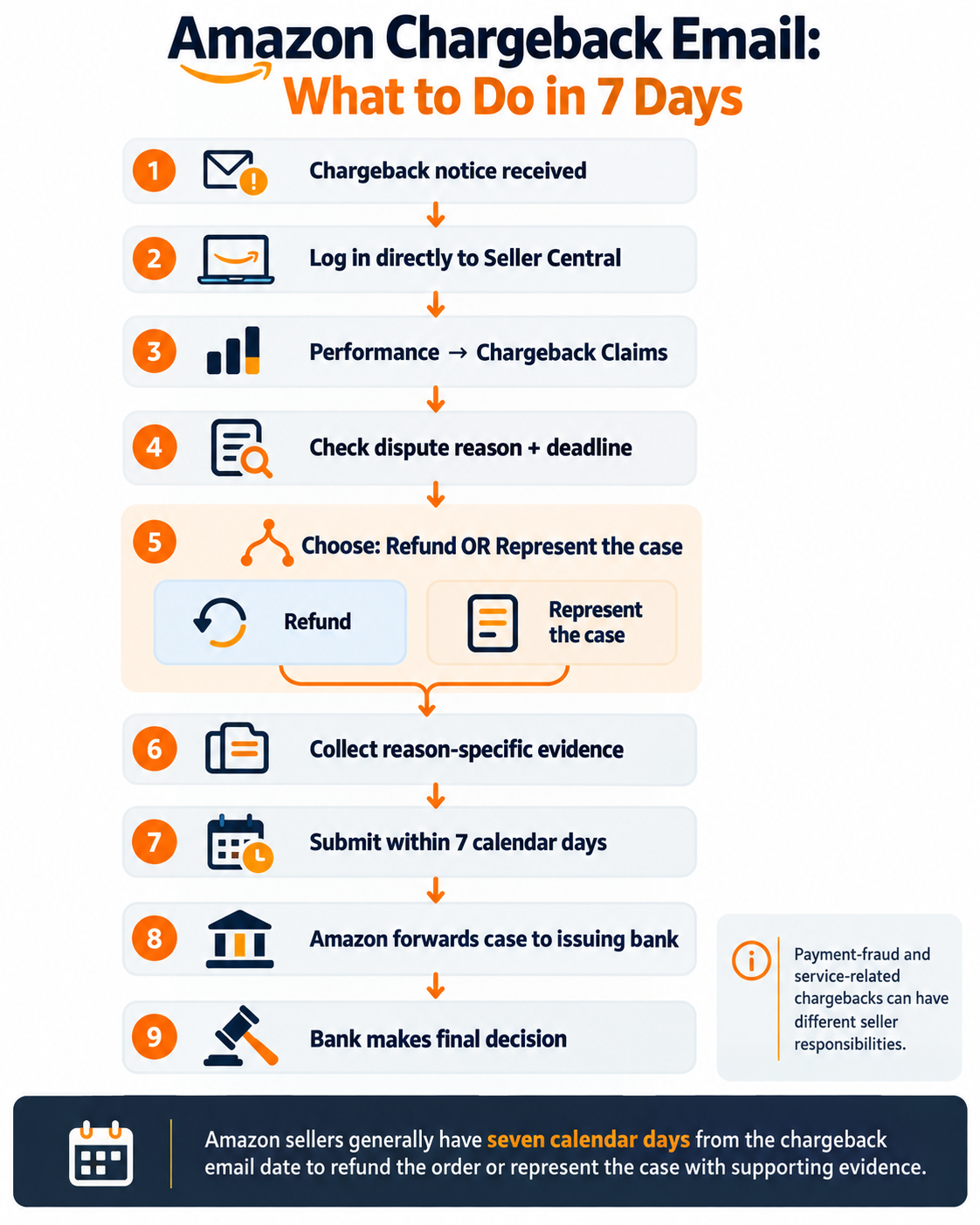
Chargeback cases come with a short response window. Sellers usually have about seven calendar days after receiving the email to take action.
If you miss the deadline, you may lose money.
Typical Chargeback Response Window:
- Amazon requires sellers to respond within 7 calendar days of the chargeback email date.
- Sellers can either issue an immediate refund or represent the case through Amazon.
- If no response is submitted within the required window, Amazon may debit the transaction from the seller account.
Consequences of Missing the Deadline:
- You could forfeit the dispute by default.
- Amazon might charge you the full amount for the transaction from your seller account.
- Missing sales deadlines repeatedly could negatively affect your Account Health metrics.
Step-by-Step Response Workflow
For sellers to fight a chargeback, they need to follow a specific process and have the right proof.
Step 1: Acknowledge the Chargeback
Open the chargeback claim in Seller Central and review the reason, Order ID, Chargeback ID, and response deadline. Amazon gives sellers two main options: issue an immediate refund or represent the case with supporting evidence. If you choose to represent the case, submit the required information within seven calendar days of the chargeback email date.
Step 2: Gather Key Transaction Details
Collect the following information to build a strong case:
- Order ID and Chargeback ID from the email
- Shipping confirmation, including the shipping date, carrier, and tracking number
- Delivery confirmation, such as a delivery scan or customer signature
- Product listing screenshot showing the product description when the customer bought it
- Customer communication logs, including messages or emails with the buyer
- Invoice or packing slip
- Photos if the dispute is about product condition or damage
Step 3: Prepare Evidence for Different Chargeback Reasons
Your response should match the exact reason for the chargeback shown in the email.
Common Chargeback Reasons and How to Respond:
Unauthorized transaction/payment fraud:
Amazon states that it is responsible for payment-related fraud chargebacks, such as stolen-credit-card or other payment-fraud claims. Review the specific chargeback notice before submitting evidence, because the seller’s required action can differ from a service-related dispute.
Item not received:
- Include tracking information, delivery scans, and confirmation that the shipping address is correct.
- Add signature confirmation if available.
Item not as described:
- Provide the product listing or description that applied at the time of purchase, relevant buyer-seller messages, and any photos or records that directly address the buyer’s complaint.
- If the product was returned, include photos showing its condition and whether the correct item was sent.
Duplicate charge:
- Show the payment information that proves that a single transaction was made.
- Include any refunds that have already been sent out.
Step 4: Format the Response Email
Keep your response simple and organized.
Email Format Template:
Subject: Chargeback Response – [Order ID] – [Chargeback ID]
Body:
- Order ID: [Insert]
- Chargeback ID: [Insert]
- Reason for Chargeback: [e.g., “Item Not Received”]
- Response Summary:
[Bullet 1: Item was shipped on [date] using [carrier], tracking number [xxx]]
[Bullet 2: Delivered on [date] with proof of delivery attached]
[Bullet 3: Product was as described; listing and communication attached]
Attachments:
- Proof of delivery
- Tracking confirmation
- Customer communication screenshots
- Listing page or product description
Evidence Checklist:
- Order and chargeback ID
- Tracking info
- Proof of delivery
- Product description
- Customer messages
- Photos or receipts
What Happens After You Submit the Response
Once you submit your response:
- An Amazon investigator reviews the documents and puts them together into a case file.
- Amazon sends this case file to the customer’s bank.
- The bank makes the final decision, not Amazon.
Timeline:
- The final outcome can take up to 90 days after the case is represented to the issuing bank, and rare cases may take longer.
- Amazon will usually contact you only if you are financially responsible for the chargeback.
- If the issuing bank decides the dispute in the seller’s favor, the seller is not financially responsible for the chargeback.
- If the bank rules in the customer’s favor, Amazon will take the disputed amount from your seller account.
Chargebacks with clear and complete documents may have a better chance of being decided in the seller’s favor.
How to Avoid or Reduce Future Chargebacks
A good way to reduce chargebacks is to stop common problems before they turn into disputes.
Good Amazon Account Management can help sellers catch common problems before they turn into chargeback disputes.
Use these tips to help prevent future chargebacks.
Seller Best Practices:
- Use clear, accurate product descriptions with real photos.
- Ship orders with tracking and delivery confirmation.
- Use signature confirmation for expensive orders.
- Respond quickly to customer questions and complaints.
- Keep records of all customer communication.
- Use a clear return and refund policy.
If Your Response Fails
Sometimes, the bank may still approve the chargeback even if you provide strong documents.
What Happens:
- Amazon deducts the disputed amount from your account.
- You may receive an email explaining the decision if you are responsible for the chargeback.
- Most bank decisions are final, and Amazon usually cannot change them.
Next Steps:
- Review the decision and see where the documentation falls short.
- Fix the process problem that caused the chargeback.
- If you think Amazon mistakenly withdrew money from your account, use the instructions in the chargeback decision email to file a review.
- Keep in mind that the issuing bank’s decision is final in most cases.
When to Seek Help:
- If you receive chargebacks often.
- If the disputed amount is very large.
- If you believe Amazon did not correctly present your case to the bank.
Also read: 4 Best Amazon Chargeback Agencies to Help You Minimize Losses
Checklist for Chargeback Success:
- Respond within 7 days.
- Collect the evidence relevant to the chargeback reason.
- Match your evidence to the chargeback reason.
- Submit a clear and complete response.
- Review past cases to prevent similar chargebacks in the future.
Final Thoughts
Chargebacks can be difficult for Amazon sellers, but having a clear process can help reduce losses and prevent future disputes.
Responding quickly, keeping good records, and providing helpful customer service are some of the best ways to manage chargebacks.
To effectively manage chargebacks and disputes, ensure the following:
- Quick Response: Respond to chargebacks quickly to avoid delays and stop the issue from getting worse.
- Strong Documentation: Keep clear records of transactions, shipments, deliveries, and customer communication.
- Consistent Customer Care: Provide helpful customer service so you can solve problems before they turn into chargebacks.
For sellers looking to simplify chargeback management, SalesDuo is the top Amazon agency to consider. If chargebacks are part of a broader account-health or operational problem, an experienced Amazon account-management team can help review the underlying processes, maintain documentation, and monitor related performance issues.
Let SalesDuo help you prevent chargebacks and optimize your Amazon account for greater profitability. Book your 1:1 growth call with SalesDuo today!
After an Amazon chargeback email arrives, gather the shipment records before seeking support with Amazon shortage claims and chargebacks.
Frequently Asked Questions About Amazon Chargeback Email
What happens if you don’t pay the Amazon chargeback?
If you do not respond to an Amazon chargeback email, Amazon may deduct the disputed amount from your seller account. Repeated chargebacks may also hurt your seller metrics and reputation on Amazon.
Will Amazon ban me if I chargeback?
No, Amazon will not automatically ban you because of one chargeback. However, repeatedly ignoring or missing chargeback alert Amazon emails may hurt your account performance and could increase the risk of account suspension.
Does Amazon send you an email for a refund?
Yes, Amazon sends a chargeback alert email when a chargeback is filed. Refunds are handled differently and are usually processed through Amazon’s normal return and refund process.
About the Author
Kevin Celestine is a powerhouse in eCommerce Business Operations and Customer Relationship Management, steering impressive growth across diverse categories. Outside work, Kevin fuels his passion for sports, globe-trotting adventures, and diving into the richness of new cultures.