
Amazon Buy Box Monitoring: How to Track Losses and Set Alerts in 2026
Amazon Buy Box monitoring helps you track who owns the Featured Offer and what is happening around it. This helps your team spot Buy Box losses, suppression, seller changes, or pricing changes before they turn into bigger business problems.
Amazon now calls the customer-facing area the Offer Display, while the offers shown there are called Featured Offers. However, “Buy Box” is still the term most sellers commonly use.
A good monitoring system should do more than send an alert. It should record what happened, capture useful details, send the issue to the right person, and confirm whether the problem was fixed.
Learn what to monitor, how to set useful Amazon Buy Box alerts, and what to do when Featured Offer ownership changes.
Quick answer: what Buy Box monitoring should tell you
Good Buy Box monitoring should help you answer six questions in order:
- What changed?
- When did it change?
- What else changed at the same time?
- Who is most likely responsible for fixing it?
- What action was taken?
- Did the situation recover?
This process is much more useful than simply getting a “won” or “lost” alert.
The same problem can happen for different reasons. A competitor may become the Featured Offer. The Offer Display may disappear or become suppressed. A new seller may appear. Your price may become less competitive. Your delivery speed or product availability may also change.
For a deeper explanation of how Amazon selects the Featured Offer, use that guide for the selection process and use this article as your monitoring playbook.
Amazon’s April 2026 Featured Offer guidance explains that the Offer Display may contain one or more Featured Offers. Because of this, your monitoring system should record what is actually happening instead of assuming that only one seller can permanently “own” the Buy Box.
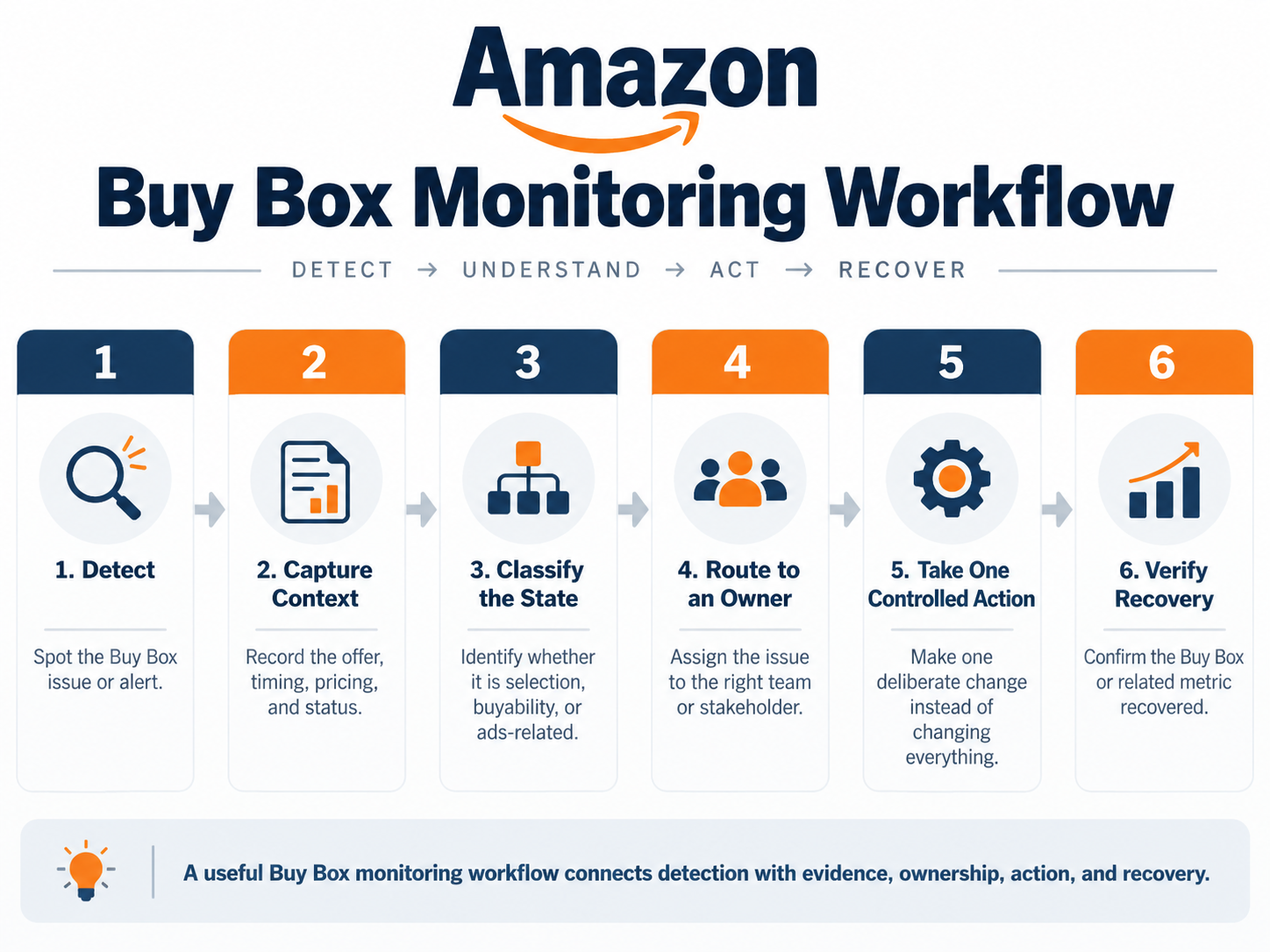
Monitoring workflow: Detect -> Capture context -> Classify -> Route -> Act -> Verify
| Alert state | First question | Evidence to capture | Likely owner |
|---|---|---|---|
| Ownership changed | Did another offer become featured, or did the Offer Display disappear? | Timestamp, seller/offer details, marketplace, and customer context | Marketplace operations |
| New seller appeared | Is this seller new, and is there a real rights or policy issue? | Seller, offer, price, condition, screenshots, or records | Brand/legal + marketplace |
| Winning price shifted | Did only the price change, or did delivery or availability change too? | Total offer details, price history, delivery promise, margin floor | Pricing/finance |
| Suppression / missing offer | Is there no Featured Offer instead of another seller winning it? | Buyability, pricing alerts, listing/offer status, availability | Marketplace/catalog |
| Repeated losses | Is the same problem happening again by ASIN, time, region, seller, or fulfillment method? | Incident history, win-rate trend, seller and delivery patterns | Analytics/account lead |
What to monitor beyond a simple win/loss alert
Ownership status is only the first signal.
A useful Amazon Buy Box monitor should collect enough information to tell the difference between a competitor winning the Featured Offer, the Offer Display disappearing, a new seller appearing, a price change, or an inventory problem.
You do not need to track every possible metric. Focus on the information that helps your team decide what to do next.
| Signal | What to record | Why it changes the response |
|---|---|---|
| Featured Offer/ownership state | Whether your offer is featured, another offer is featured, multiple featured offers are visible, or no featured offer is shown | Helps separate competitor losses from missing or suppressed offers |
| Suppression or missing Offer Display | Whether purchase buttons disappear or “See options” appears instead | A missing offer should be diagnosed before anyone changes the price |
| Winning price / total-offer context | Item price, shipping cost when relevant, and competitive/reference price information | Helps show whether price may be part of the problem without assuming price is the only cause |
| Seller identity | Seller name or ID when available, condition, and whether the seller is new | Helps separate normal competition from real rights or policy issues |
| Inventory and delivery context | Stock status, buyability, fulfillment status, and customer-facing delivery promise | A slow or unavailable offer may lose competitiveness even when the price is good |
| History / win-rate trend | Change history, repeated incidents, duration, and Featured Offer percentage when available | Helps separate a one-time event from a repeated portfolio problem |
Minimum alert evidence: Record the ASIN/SKU, marketplace and customer context, timestamp, ownership or suppression state, price and offer details, seller identity when available, inventory and delivery information, and the action taken.
Keep both the before-and-after records. This helps the next person understand what changed without having to investigate everything again.
2026 policy note: Do not build your monitoring system around a fixed seller-level eligibility checklist. Amazon’s July 2026 announcement says seller-level eligibility requirements are being gradually removed across Amazon stores through the end of 2026.
Amazon also says the Featured Offer selection process itself is not changing. Being considered for the Featured Offer also does not mean your offer will automatically be selected.
How to set up Amazon Buy Box monitoring and alerts
Start with your business needs before choosing software.
First decide which ASINs need faster monitoring, which changes should trigger an alert, who should receive those alerts, what information should be included, and what action the person receiving the alert should take.
After that, choose a tool that can support the workflow.
If you want to compare current software options, use SalesDuo’s guide to compare Amazon Buy Box monitoring tools. This article focuses on the monitoring process instead of repeating a ranked list of tools.
- Prioritize ASINs by business impact and volatility. Look at historical units and revenue, sessions, contribution margin, advertising dependence, seasonal importance, product launches, competitor activity, and repeated incidents.
- Define alert states, not just generic changes. Examples include ownership changed, Offer Display missing, new seller appeared, winning price shifted, delivery promise worsened, or the same ASIN repeated an earlier problem.
- Choose a monitoring cadence the business can support. High-impact ASINs with frequent changes may need faster alerts. Stable, lower-impact products can usually be reviewed less often.
- Choose alert channels based on urgency. Use the channel your team will actually respond to, such as email, dashboard notifications, messaging tools, or another supported workflow. Reserve high-urgency routes for high-impact exceptions so routine changes do not create alert fatigue.
- Set the alert payload. Make sure the alert includes the important evidence before it reaches a person. A simple “Buy Box lost” message creates more investigation work instead of reducing it.
- Capture a baseline before monitoring begins. Record the normal ownership state, recent Featured Offer trend, price, inventory, delivery promise, and other signals you plan to compare. Without a baseline, an alert tells you that something changed but gives you less context for deciding whether the change matters.
- Route to a named owner and backup. Pricing, marketplace operations, catalog, supply chain, advertising, and brand/legal teams solve different types of problems.
- Test the workflow before scaling it. Trigger or simulate a known change. Check whether the alert arrives correctly, whether the owner has enough information to act, and whether the final result is recorded.
| Alert field | Example |
|---|---|
| ASIN / SKU | B0XXXX / SKU-123 |
| Marketplace | Amazon.com |
| Detected at | 10:42 AM ET |
| State | Featured Offer ownership changed |
| Previous state | Our offer featured |
| Current state | Competitor offer featured |
| Our total price | $29.99 |
| Current featured offer | $28.99 |
| Inventory / delivery | In stock; delivery promise unchanged |
| Assigned owner | Marketplace Operations |
| First action | Compare full offer context before changing price |
Note: Illustrative alert only. Your actual fields should match the data your monitoring system can reliably capture.
Prioritize the ASINs that deserve faster monitoring
Not every ASIN needs the same level of monitoring.
Monitoring every product at the same intensity can create unnecessary costs and too many alerts.
Give faster attention to products where losing the Featured Offer could create a bigger business impact. This may include high-session products, high-volume SKUs, products that depend heavily on ads, products with strong contribution per unit, seasonal launches, and ASINs with repeated Featured Offer changes.
Lower-impact products that usually stay stable can be reviewed periodically instead.
Do not turn these factors into a fixed Amazon-wide rule. Each business should set its own priorities.
Illustrative exposure estimate: Historical units per hour x contribution margin per unit x alert duration in hours x observed Featured Offer share-loss fraction.
For example, imagine an ASIN normally sells 20 units per day and contributes $12 per unit. If the problem lasts six hours and its observed Featured Offer share drops by 50 percentage points, the estimate would be:
20/24 x $12 x 6 x 0.50 = $30 of contribution exposure.
This is only a way to estimate priority. It does not mean the monitoring system definitely “saved” $30. Traffic, customer demand, advertising, competitors, and many other factors can change at the same time.
Match monitoring cadence to business impact
Your monitoring cadence should depend on how quickly an issue can hurt the business and how quickly your team can actually respond.
“Real time” monitoring is not automatically necessary for every ASIN. You should also avoid using “real time” as a general marketing claim unless the tool or data source truly supports it.
The important question is simple: does the alert arrive early enough for your team to take useful action?
| ASIN condition | Cadence approach | Human review pattern |
|---|---|---|
| High impact + high volatility | Use the fastest supported exception monitoring that makes sense for the business risk | Respond when the alert appears and review repeated causes on a regular schedule |
| High impact + stable | Use alerts for major changes plus regular trend reviews | Avoid reacting to small changes and investigate longer-lasting shifts |
| Lower impact + volatile | Use filtered alerts or grouped reviews so the team is not flooded with notifications | Escalate when the duration or business exposure reaches an internal threshold |
| Lower impact + stable | Periodic review is usually enough | Use portfolio-level summaries unless a serious exception appears |
Route each alert to a named owner
An alert without a clear owner can quickly become ignored inbox noise.
Before monitoring starts, define who is mainly responsible, who the backup person is, and when the issue should be escalated.
The first person receiving the alert should usually be the team that can confirm and control the suspected problem. It should not automatically be the person who manages the monitoring dashboard.
| Observed signal | Primary owner | Typical first responsibility |
|---|---|---|
| Price / total-offer shift | Pricing/finance | Review pricing details and approved margin floors before making a price change |
| Ownership change with no obvious price move | Marketplace operations | Check the current state, competing offer, delivery, availability, and account details |
| Missing/suppressed offer or listing issue | Marketplace/catalog | Check buyability, listing and offer status, suppression signals, and pricing alerts |
| Inventory or delivery degradation | Supply chain/fulfillment | Check stock, inbound issues, handling time, and the delivery promise customers can see |
| Ad delivery changed with Featured Offer loss | Advertising + marketplace operations | Fix the offer issue first, then review campaign delivery again |
| New seller with legitimate rights/policy concern | Brand/legal + marketplace | Save the evidence and use the correct rights or policy process instead of assuming every seller can be removed |
For a specific example of this type of monitoring, SalesDuo’s Buy Box instability case study says Buy Box movement on selected ASINs was monitored daily to support timely action against unauthorized third-party sellers.
This is one case-specific example. It does not mean daily monitoring is the right choice for every catalog.
What to do when a Buy Box alert fires
Before changing the price, first understand what type of problem actually happened.
A “lost” Featured Offer may mean that a competitor has become the Featured Offer. A suppressed or missing Offer Display may mean that no Featured Offer is currently available at all.
Start with the evidence. Choose one likely cause. Send the issue to the correct owner. Then check whether the action fixed the problem before making more changes.
| Alert state | First check | Evidence to capture | Owner | First controlled action/escalation |
|---|---|---|---|---|
| Competitor becomes Featured Offer | Check that your offer is still buyable and compare the full offer and delivery details, not only price. | Timestamp, competitor seller/price/condition, your price, delivery promise, stock | Marketplace ops + pricing | Test the smallest controllable difference within margin limits. Escalate if there is no safe commercial action |
| Offer Display missing/suppressed | Check whether there is no Featured Offer instead of another seller winning it | Product-page state, buyability, stock, pricing alerts, listing/offer status | Marketplace/catalog | Fix the buyability, pricing, or suppression issue before changing price |
| New seller appears | Check whether this is normal competition or a real rights/policy issue | Seller identity, offer condition, price, screenshots/records, and authenticity evidence when relevant | Brand/legal + marketplace | Save the evidence and use the proper policy or legal process. Do not assume that being “unauthorized” automatically means the seller can be removed |
| Winning price shifts | Check whether delivery, availability, or seller also changed | Price history, landed price, delivery promise, stock, competing offer | Pricing/finance | Review margin floor and reference-price details before making any change |
| Availability/delivery worsens | Check stock, inbound inventory, handling time, fulfillment coverage, and delivery promise. | Inventory status, inbound status, and delivery estimate for the customer | Supply chain/fulfillment | Fix availability or delivery reliability before treating it as a pricing problem |
| Recurring loss pattern | Stop looking at only one incident and move to trend analysis | Incident history, duration, seller/time/region pattern, win-rate trend, business impact | Analytics/account lead | Group repeated causes, assign a process owner, and escalate problems that affect multiple teams or many products |
A good first response should be small and controlled.
Record the starting situation. Choose the most likely cause that your team can control. Change only one variable when possible. Decide in advance what recovery should look like.
If the situation does not improve, go back and review the problem again instead of changing pricing, inventory, catalog details, and advertising all at once.
If the alert confirms that you genuinely lost Featured Offer ownership and you need a deeper recovery process, use SalesDuo’s guide to win back a lost Featured Offer.
The purpose of monitoring is to help you reach the right diagnosis faster. It should not try to replace the full recovery process.
How to measure whether monitoring is actually helping
Measure the full monitoring process, not only the final Buy Box win rate.
Monitoring is useful when it helps your team detect problems sooner, understand them faster, shorten the length of avoidable incidents, and make better decisions using clear evidence.
Featured Offer share, conversion, advertising performance, and contribution can help you understand the business impact. However, they should not automatically be treated as proof that the monitoring alert caused the improvement.
| Metric | Definition | What improvement means |
|---|---|---|
| Time-to-detection | Time between the observed change and the monitoring record or alert | The team learns about important changes sooner |
| Time-to-triage | Time between the alert and the issue being classified and assigned to an owner | Less time is wasted between seeing the signal and making a useful decision |
| Incident duration | Time the loss or suppression continues before recovery or closure | Problems stay unresolved for less time |
| Repeat incidents | Number or rate of the same root-cause problem by ASIN or process | The team fixes the real process problem instead of repeatedly treating the symptom |
| Featured Offer trend | Ownership or share movement over a useful period | Helps separate normal short-term changes from longer-term decline |
| Business impact context | Sessions, units, contribution, ad dependence, and inventory risk during the incident | The team prioritizes incidents based on business impact instead of simply counting alerts |
Use Buy Box analytics and diagnosis when repeated incidents need deeper pattern analysis.
Use the dedicated guide to Featured Offer percentage when your next task is understanding and calculating the metric instead of designing alerts.
When monitoring software is not enough
Monitoring is mainly a detection system.
It tells you that something changed. When it is set up properly, it also saves useful information about the change.
However, monitoring software cannot automatically diagnose every problem, choose the right action without risking your margins, or coordinate several teams for you.
What happens after the alert depends on the type of problem.
| Need | Best-fit capability | What it should do |
|---|---|---|
| Detect and record changes | Monitoring/tracker | Track ownership, suppression, seller, price, delivery, or availability changes and send useful alerts |
| Explain patterns across many incidents | Analytics/business intelligence | Connect incident history with sales, margin, inventory, advertising, and competitor information |
| Change price automatically within rules | Repricing | Adjust prices using approved rules, minimums, maximums, and exception controls |
| Coordinate cross-functional recovery | Managed operations/account management | Bring together pricing, catalog, supply chain, advertising, and policy teams and confirm recovery |
If automatic pricing is the next step, compare Amazon repricer tools or review Amazon Automate Pricing while using clear margin limits.
Monitoring and repricing may be available inside the same software, but they still perform different jobs.
A repricer changes the price. A monitoring system detects and records changes.
If the problem affects many products, several marketplaces, or repeatedly involves pricing, inventory, advertising, and operations together, the SalesDuo Business Intelligence Dashboard may be the more useful next step.
SalesDuo’s current public BI page describes competition benchmarking, availability and buyability reporting, and ASIN-level information that can support a wider investigation beyond a single alert.
If the issue also requires coordinated execution across pricing, catalog, inventory, advertising, fulfillment, and marketplace operations, Amazon account management may be a better fit than another monitoring tool.
Build a Buy Box monitoring workflow your team can act on
Effective Amazon Buy Box monitoring is not just a dashboard or notification.
It should work as a complete detection-and-response system.
Prioritize high-impact ASINs, capture evidence, route each alert to a named owner, take a controlled action, and measure recovery.
Buy Box monitoring needs a response plan, and a full-service Amazon agency can coordinate pricing reviews, inventory checks, and listing updates.
If Featured Offer problems are becoming difficult to manage across teams or across a large portfolio, book a 1:1 Growth Call with SalesDuo to review the highest-impact monitoring and operating gaps.
Frequently Asked Questions
What is Amazon Buy Box monitoring?
Amazon Buy Box monitoring is the process of tracking changes in Featured Offer and Offer Display status, along with the information needed to understand those changes.
This may include seller identity, price, delivery, availability, suppression status, and previous history.
Monitoring helps you detect and record changes. It does not guarantee that Amazon will select your offer as the Featured Offer.
How often should I monitor the Amazon Buy Box?
Your monitoring frequency should depend on the importance of the ASIN, how often its Featured Offer status changes, what your data source can support, and how quickly your team can respond.
High-impact, competitive, ad-dependent ASINs may need faster exception alerts.
Stable, lower-impact ASINs can usually be checked periodically.
There is no single Amazon monitoring interval that is right for every catalog.
What should a Buy Box alert include?
At minimum, a Buy Box alert should include the ASIN/SKU, marketplace and customer context, timestamp, ownership or suppression status, price and offer details, seller identity when available, inventory and delivery information, and the owner or action taken.
The person receiving the alert should have enough information to understand the issue without having to rebuild the whole incident from the beginning.
Is Buy Box monitoring software the same as a repricer?
No.
Buy Box monitoring software detects and records changes in Featured Offer status and related information.
A repricer changes the product price using rules or algorithms.
Some tools include both features, but they still perform different jobs.
Understand the problem first so that changing the price does not become the automatic response to an inventory, delivery, catalog, or suppression issue.
What is the difference between a lost Buy Box and a suppressed Featured Offer?
A lost Featured Offer usually means another seller’s offer is currently featured while your offer is still available.
A suppressed or missing Offer Display means there may be no Featured Offer shown at all.
The first steps are different for each situation. That is why your monitoring system should identify the actual state before anyone changes the price.
Can Buy Box monitoring tell me why I lost the Featured Offer?
It can give you useful evidence that helps narrow down the possible cause, but an alert may not prove exactly why the loss happened.
Price, delivery, inventory, seller or account performance, catalog status, suppression, and competitor changes can all affect the situation.
Use the monitoring information to create a likely explanation, then check it against the correct operational data.
What is the best Amazon Buy Box monitoring tool?
The best tool depends on your catalog size, marketplaces, the signals you want to monitor, alert frequency, historical data needs, notification channels, integrations, and whether you also need analytics or repricing.
Use a current tool comparison when choosing software instead of assuming that the same monitoring solution will work for every business.
Does a monitoring tool guarantee I will win the Buy Box?
No.
Amazon decides which offers become Featured Offers. Its 2026 guidance also makes it clear that simply being considered does not guarantee that your offer will be selected.
Monitoring can help you detect and investigate changes sooner, but it cannot guarantee that Amazon will select your offer.
Repricing also cannot guarantee Featured Offer selection.
About the Author
Meet Nandita Nair, an Associate Content Writer at SalesDuo, passionate about creating impactful content that helps Amazon businesses grow and thrive. When she’s not writing, she finds joy in listening to music, exploring art, and getting lost in the world of novels.
