
Amazon Buy Box Analytics & Strategy: Win More Sales in 2026

To understand Amazon Buy Box analytics, start with one simple question: what changed in your Featured Offer share, which ASINs were affected, and what caused the change?
Amazon now calls the Buy Box the “Featured Offer.” However, most sellers still call it the Buy Box.
Buy Box analytics is not about watching only one percentage. You need to connect changes in Featured Offer share with other important data, such as page views, conversion rate, pricing, inventory, delivery speed, seller performance, and competitor activity. This helps you understand what went wrong and what you should fix first.
An account-wide percentage can sometimes hide the real problem. For example, one high-selling ASIN may lose Featured Offer share because the delivery time became slower. Another ASIN may lose sales because it went out of stock.
So, treat the Featured Offer percentage as the starting point of your investigation, not the final answer.
What to measure first
| Signal | Why it matters | First comparison |
|---|---|---|
| Featured Offer % / share | Shows whether your offer visibility changed | Compare the same ASIN/SKU with a similar previous period |
| Detail-page views / sessions | Helps separate traffic problems from Featured Offer problems | Compare the same ASIN, marketplace, and time period |
| Unit sales / conversion | Shows whether visitors still bought after the share changed | Compare before and after the change |
| Price / competitive price | Helps check whether pricing or a competitor move caused the problem | Compare your total price with competitor and external reference prices |
| Inventory / availability | Helps find stockout or availability problems | Check inventory around the time the share dropped |
| Delivery promise | Helps find changes in delivery speed or reliability | Compare delivery promise before and after the change |
What Buy Box analytics actually measures in 2026
Buy Box analytics measures how often your offer appears as the Featured Offer, where that share changes, and which business or operational factors may be connected to the change.
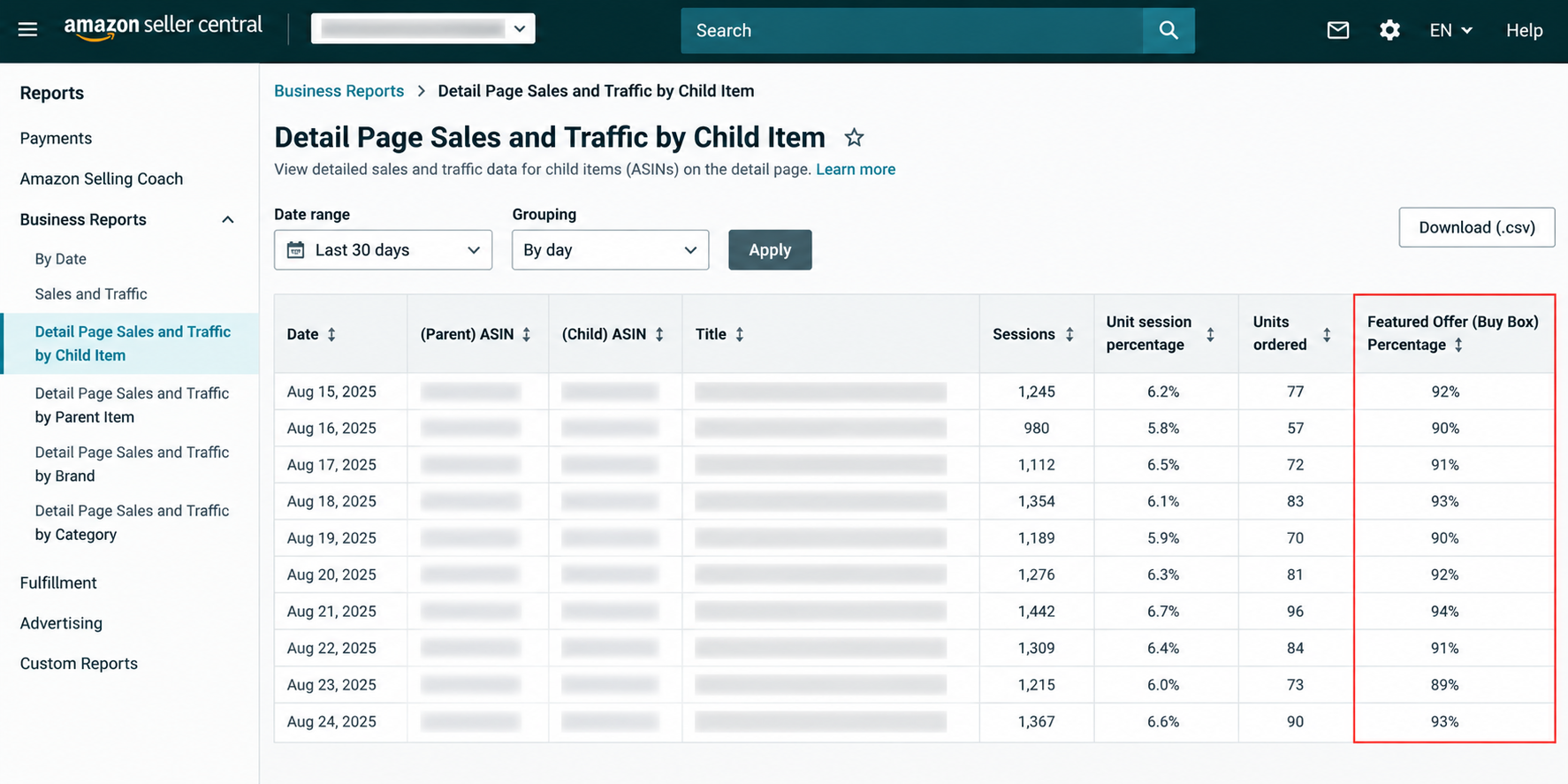
Amazon defines Featured Offer percentage using page views: it compares page views where your offer was the Featured Offer with total page views for your active listed products. Amazon shows a dash when it cannot calculate the metric.
In an August 2026 Amazon moderator reply, sellers were directed to Business Reports → Detail Page Sales and Traffic by Child Item. Amazon also noted that some sellers were seeing inaccurate Featured Offer percentages in other views and recommended checking this report when the number looks wrong.
Because Seller Central interfaces can change, confirm the current label and report location in the U.S. account before documenting internal instructions or publishing screenshots.
Do not assume Seller Central Featured Offer percentage and every third-party “Buy Box win rate” mean the same thing.
Some monitoring tools calculate Buy Box win rate by checking the page at regular times and recording which seller owns the Buy Box. Seller Central uses customer page views instead.
Before combining data from different tools, write down:
- The exact metric definition.
- Time zone.
- Marketplace.
- Sampling method.
- Level of data, such as ASIN, SKU, or account level.
There is also a major 2026 policy distinction.
Amazon announced in July 2026 that it is removing seller-level Featured Offer eligibility requirements through a phased global rollout. Amazon plans to complete this change by the end of 2026.
Amazon also said that the Featured Offer selection process itself is not changing. It will continue looking at customer-focused signals such as competitive pricing, delivery speed, and seller performance.
Being considered for the Featured Offer still does not mean your offer will automatically win it.
This is important when analyzing data. You should separate these three questions:
- Was your offer considered?
- Was your offer selected?
- How much Featured Offer share did your offer receive?
For a broader explanation of how Amazon chooses the Featured Offer, see how Amazon selects the Featured Offer instead of repeating the full list of factors here.
Build the measurement baseline before diagnosing a loss
A clean baseline helps you avoid blaming the wrong problem.
Start your analysis at the ASIN or SKU level. Compare the same marketplace across a useful before-and-after period.
Do not start with account-wide averages. First understand what happened to the products that generate the most revenue or profit.
Create one row for each ASIN/SKU and include:
- Marketplace, ASIN, SKU, fulfillment method, and offer condition.
- Baseline period and comparison period, including promotions or seasonal events.
- Featured Offer percentage or the exact win-rate metric used by your monitoring tool.
- Detail-page views or sessions, unit sales, conversion rate, and average order value.
- Your total price, reference or competitive price, and important competitor price changes.
- Inventory status, stockout timing, stranded or suppressed status, and restocking events.
- Delivery promise or fulfillment changes, plus any important Account Health or customer-experience event.
Then normalize the comparison.
For example, if traffic doubled because of Prime Day, looking only at total sales will not tell you much about Buy Box performance.
If an ASIN was out of stock for half of the period, account-level averages may make the Featured Offer loss look smaller than it really was.
Compare similar periods and clearly note important events on the timeline.
For a wider view of revenue and conversion data, use an Amazon sales data analysis framework so you do not look at Buy Box data by itself.
Diagnose why Buy Box share changed
Start with the signal and then look for evidence. Do not start with assumptions.
First, identify when the Featured Offer share changed. Then test the most likely reasons for that specific ASIN and time period.
A price change, stockout, slower delivery, competitor move, or Account Health problem around the same time gives you something to investigate. However, timing alone does not prove that one of these things caused the loss.
Amazon’s current public guidance highlights several important Featured Offer factors, including competitive pricing, shipping speed and reliability, customer order experience, and inventory availability.
Amazon’s Featured Offer overview is a good place to understand the platform-level basics. Your job is to find out which factor actually changed for the ASIN you are analyzing.
| Signal observed | Evidence to check | Likely owner | Next action | How to confirm recovery |
|---|---|---|---|---|
| Share drops after your price increases or a competitor lowers its price | Your total price, competitive external price, competitor prices, and margin floor | Pricing / marketplace owner | Test a price change that protects margin or use a repricing rule. Do not simply race to the lowest price | Check whether share becomes stable after the change while margin remains acceptable |
| Share drops after delivery promise becomes worse | Delivery dates, fulfillment method, handling time, and late-shipment events | Operations / fulfillment | Improve delivery speed and reliability where possible | Check whether share and conversion improve after delivery returns to normal |
| Share falls around a stockout or offer disappearance | Inventory history, stranded or suppressed status, and active offer status | Supply chain / catalog | Restore the offer, replenish inventory, or fix the suppression | Confirm the offer is active and share improves during the next similar period |
| Share weakens when seller performance gets worse | Account Health, customer order experience, cancellations, and late shipments | Account manager / operations | Fix the main service problem. Do not rely on made-up “guaranteed” thresholds | Check whether performance improves and the ASIN trend recovers |
| Share changes even though your offer did not change | Competitor entry or exit, competitor prices, fulfillment, and delivery promise | Marketplace / pricing | Find out what advantage the competitor gained before changing your own offer | Check whether your action reduces the gap or whether share improves after competitor conditions change |
Pricing and competitive-offer signals
If Buy Box share dropped after a pricing change, compare the total customer price, not only the product price.
Also check whether competitors changed their price, fulfillment method, or delivery promise at the same time.
A lower price can make your offer more competitive, but it does not guarantee Featured Offer selection.
Cutting the price too much can also damage your profit. Winning more Buy Box share is not useful if the extra sales are no longer profitable.
Use a margin-aware Amazon pricing strategy to set minimum prices and clear pricing rules before automating price changes.
Fulfillment and delivery-promise signals
Check the delivery promise customers actually see before blaming the fulfillment method itself.
A slower or less reliable delivery promise can affect Featured Offer performance even when the product is still in stock.
Amazon says that faster shipping, free shipping, and more reliable delivery dates can improve Featured Offer potential.
Merchant-fulfilled offers can still compete when they provide a strong customer experience, good pricing, and reliable delivery.
Inventory, availability, and suppression signals
Inventory problems are often easier to confirm because they usually create a clear timeline.
Compare the Featured Offer share drop with:
- Stockout timing.
- Offer inactivity.
- Stranded inventory.
- Listing or offer suppression.
If the Featured Offer disappears completely, first find out whether another seller won it or whether Amazon is currently showing no Featured Offer at all.
These are two different problems and need different solutions.
For deeper troubleshooting after confirming a loss or suppression issue, use SalesDuo’s guide to diagnose and win back a lost Featured Offer.
Seller performance and customer-experience signals
Use Account Health and order-experience data as supporting evidence, not as a secret Buy Box formula.
Review changes in seller performance around the time the Featured Offer share dropped.
Ask whether those problems may have made the customer experience worse compared with competing offers.
Also, do not assume that one healthy account metric can cancel out a weaker price, poor inventory availability, or slower delivery.
Quantify the business impact
Prioritize Buy Box problems based on business impact, not only on the size of the percentage drop.
For example, a 15-point drop on one of your highest-selling ASINs may be much more serious than a 50-point drop on a product with very little traffic.
Use a traffic field that matches the denominator of your conversion metric. If your conversion rate is session-based, use sessions rather than page views. The example below is illustrative and assumes the conversion input and traffic input use the same denominator.
Illustrative revenue-at-risk formula
Detail-page views x baseline conversion rate x average order value x lost Featured Offer share
| Illustrative assumption | Value |
|---|---|
| Sessions | 10,000 |
| Baseline order conversion rate | 12% |
| Average order value | $30 |
| Featured Offer share loss | 20 percentage points, such as 70% to 50% |
| Directional revenue at risk | 10,000 × 0.12 × $30 × 0.20 = $7,200 |
This $7,200 number is not a guaranteed sales loss.
The calculation assumes that losing Featured Offer share causes orders to fall at the same rate while conversion rate and average order value stay the same.
Real results may be different because demand, conversion, competitor activity, ad eligibility, seasonality, and customer behavior can change at the same time.
For profit-focused decisions, replace average order value with contribution per unit.
Using the same example with $9 contribution per order, assuming one unit per order:
10,000 x 0.12 x 0.20 x $9 = $2,160
This gives you an estimated contribution at risk of $2,160.
This approach helps prevent teams from trying to “win back share at any cost.” You may increase revenue by lowering prices, but you could also reduce profit.
Turn diagnosis into an action queue
Your next action should depend on three things: business exposure, strength of evidence, and how easy the action is to reverse.
Start with ASINs where:
- The financial impact is large.
- The suspected cause has strong evidence.
- The fix can be tested without creating a bigger profit or customer-experience problem.
| Priority | Example pattern | Action | Recovery check |
|---|---|---|---|
| P1: High exposure + strong evidence + reversible | Price moved above a competitive reference while inventory and delivery stayed stable | Test a controlled pricing change or pricing rule | Recheck Featured Offer share, conversion, and contribution after the change |
| P2: High exposure + uncertain cause | Share dropped, but price, inventory, and delivery all look normal | Collect more competitor and account data before changing anything | Take action only after one possible cause has stronger evidence |
| P3: Structural or slow-to-fix | Ongoing delivery disadvantage or inventory limitation | Assign an owner and timeline and estimate the possible business benefit | Keep tracking the trend until the limitation changes |
| Watchlist: Low exposure | Big percentage loss on a low-impact SKU | Monitor unless the same problem starts happening across more products | Escalate if the financial impact or frequency increases |
If pricing automation is part of the solution, compare how tools handle pricing rules, minimum price limits, and change history before choosing one.
SalesDuo’s Amazon repricer tools comparison is a better place to compare repricing tools.
Build a weekly Buy Box analytics cadence
A useful monitoring process should separate urgent incidents from regular portfolio reviews.
High-value ASINs may need daily monitoring when something important changes.
The full portfolio can usually be reviewed weekly.
Do not use one universal “good” Buy Box percentage or one alert threshold for every product.
Set thresholds based on each ASIN’s normal performance, value, volatility, and competition.
| Cadence | What to review | Output |
|---|---|---|
| Daily / incident | Major Featured Offer changes on high-value ASINs, offer disappearance, stockouts, and large delivery or price changes | Record the time, affected ASIN/SKU, possible cause, owner, and immediate action |
| Weekly | Portfolio trends by marketplace and ASIN, plus the biggest revenue or contribution risks | Rank problems, review unresolved causes, and check whether previous fixes worked |
| Monthly | Repeated Featured Offer losses, long-term fulfillment problems, recurring competitor behavior, and tool coverage | Improve operating rules, ownership, data sources, and automation where needed |
Keep a record of every important action you take.
For each major event, write down:
- The metric before the problem.
- Suspected cause.
- Supporting evidence.
- Action taken.
- Owner.
- Time the action was implemented.
- Recovery period.
This helps your team avoid repeating the same unproven fix.
It also makes it easier to understand the difference between two things happening at the same time and an action that actually improves performance.
When your portfolio becomes too large to manage with manual spreadsheets, use one consistent analytics workspace.
For teams that need one workspace across sales, competition, conversion, availability, and other Amazon signals, the SalesDuo Business Intelligence Dashboard can support the broader analysis. Confirm the fields required for your Buy Box workflow before implementation.
When software or managed support is useful
Software is most helpful when collecting data and receiving alerts takes too much time. Managed support is more helpful when the problem involves several different teams.
If you manage many ASINs or marketplaces, compare software based on:
- How the tool defines its metrics.
- How often it checks Buy Box ownership.
- Competitor coverage.
- Historical data.
- Export options.
- Alert controls.
- Audit history.
Do not choose a tool only because it shows a “win rate.” First understand how the tool calculates that number.
For software options, see SalesDuo’s Buy Box monitoring tools comparison.
If the problem involves pricing, inventory, catalog issues, fulfillment, and seller performance at the same time, Amazon account management may be more useful.
In that situation, the real problem is coordinated execution across different areas, not the lack of another dashboard.
Turn Buy Box data into the next right action
The most useful question is not, “How do I increase my Buy Box percentage?”
The better question is:
“Which ASIN lost an important amount of Featured Offer share, what evidence best explains the loss, and what action can we test without hurting profit or customer experience?”
Start by measuring the problem.
Then find the most likely cause.
Estimate the financial impact.
Take the right action.
Finally, monitor whether performance improves.
If the problem is large, keeps happening, or involves several teams, bring your Featured Offer trend, affected ASINs, and suspected causes to a 1:1 Growth Call with SalesDuo.
The goal should be to leave with a clear diagnosis and a prioritized action plan, not another general list of Buy Box factors.
Putting Buy Box analytics into practice takes coordinated pricing, inventory, and ad decisions, which a full service Amazon agency can manage.
FAQs
What is Amazon Buy Box analytics?
Amazon Buy Box analytics is the process of measuring and understanding Featured Offer share together with ASIN-level data that may explain why it changed.
This includes page views, conversion rate, price, inventory, delivery promise, seller performance, and competitor activity.
The goal is to understand why the share changed and turn that information into a clear action plan.
How is Featured Offer percentage calculated?
Amazon describes Featured Offer percentage as the number of page views where your offer appeared as the Featured Offer divided by the total page views received by your active listed products where Amazon can calculate the metric.
It is based on page views.
So, do not assume it is the same as a monitoring tool’s Buy Box win rate, which may be based on regular page snapshots.
Where can I find Buy Box or Featured Offer data in Seller Central?
As of August 2026, Amazon moderator guidance directs sellers to Business Reports -> Detail Page Sales and Traffic by Child Item to find Featured Offer percentage.
Seller Central navigation may change depending on the interface, account, or marketplace.
Always confirm the current location and label before creating internal instructions or screenshots.
Why did my Buy Box percentage drop even though my price did not change?
Price is only one possible reason.
Check whether your delivery promise, inventory, offer availability, seller performance, or competitor offers changed around the same time.
A competitor may improve its own offer even when you make no changes to yours.
Does FBA guarantee the Buy Box?
No.
Amazon does not say that FBA guarantees Featured Offer selection.
Fulfillment can affect the customer’s delivery experience, but Amazon also looks at other customer-focused factors.
Merchant-fulfilled offers can still compete when their pricing, delivery promise, and seller performance are strong.
What is a good Buy Box percentage?
There is no single Buy Box percentage that is good for every ASIN.
The right baseline depends on competition, offer structure, category, marketplace, inventory, and the business importance of the ASIN.
Compare each ASIN with its own past performance and investigate important changes in context.
How often should I monitor Buy Box performance?
Use exception monitoring when an important high-value ASIN has a sudden problem.
Use a weekly portfolio review to look at trends, priorities, and recovery.
Set your own alert thresholds based on the normal performance and value of each ASIN instead of using one generic percentage as an Amazon benchmark.
What tools can track Buy Box changes?
Buy Box monitoring and repricing tools can track offer ownership, pricing changes, competitor activity, and historical performance.
However, different tools calculate their metrics differently.
Before choosing a tool, compare:
- How it calculates Buy Box win rate.
- How often it checks the page.
- Which marketplaces it supports.
- How much historical data it keeps.
- Whether it provides enough data to investigate the cause of a change.
About the Author
Meet Nandita Nair, an Associate Content Writer at SalesDuo, passionate about creating impactful content that helps Amazon businesses grow and thrive. When she’s not writing, she finds joy in listening to music, exploring art, and getting lost in the world of novels.
