How to Use Amazon Brand Analytics Effectively in 2026

Amazon Brand Analytics is a suite of first-party Seller Central dashboards that helps eligible brands understand the shopper journey from product discovery and evaluation to purchase and repeat purchase.
Instead of relying solely on sales and advertising data, brands can use ABA to analyze search queries, funnel performance, repeat purchases, loyalty, product relationships, and customer journeys. Most importantly, brands need to know which report to use, which issue the data indicates, and what action to take next.
In this guide, we’ll explain where to find Brand Analytics, who can access it, what each dashboard measures, and how to use the data for Amazon SEO, PPC, product strategy, bundling, and retention.
Amazon Brand Analytics Quick Answer
Amazon Brand Analytics, or ABA, is a Seller Central analytics suite for eligible brand owners and Brand Representatives enrolled in Amazon Brand Registry. It uses aggregated search, product-interaction, and purchase data to show how a brand performs across the Amazon shopping journey.
Amazon currently classifies Brand Analytics into Search Analytics, Consumer Behavior Analytics, Customer Loyalty Analytics, and Customer Journey Analytics. The core dashboards comprise Search Query Performance, Search Catalog Performance, Top Search Terms, Repeat Purchase Behavior, Demographics, Market Basket Analysis, Customer Loyalty Analytics, and Customer Journey Analytics.
There are also "High-impact products" and "Customer segments". Availability of the dashboard may differ by marketplace, account permissions, and your account status, so please check the options in the Seller Central account you use.
ItemAnswerAvailable inAmazon Seller CentralMenu pathBrands → Brand AnalyticsAccessEligible Brand Registry representativesSeparate ABA feeNo separate subscriptionBest starting reportSearch Query PerformanceMain usesSEO, PPC, conversion, retention, and product strategy
What Is Amazon Brand Analytics?
Amazon Brand Analytics is Amazon’s first-party, aggregated analytics suite for registered brands. Unlike a standard sales dashboard, it connects customer searches, product interactions, purchases, and repeat-purchase behavior so teams can see where shoppers enter, progress through, or leave the funnel.
Amazon Brand Analytics is not the same as Business Reports, Amazon Ads reporting, Amazon Attribution, Amazon Marketing Cloud, or Vendor Central retail analytics. Business Reports show traffic and sales. Amazon Ads reports show attributed advertising activity. ABA is more useful when the question is how customers searched, where the brand gained or lost funnel share, what shoppers bought together, and whether they returned.
Why Amazon Brand Analytics Matters
A drop could start with reduced visibility, lower CTR, an uninspiring product page, an uncompetitive offer, or a cart-to-purchase issue. Brand Analytics slim the diagnosis by segmenting search activity by stage, enabling teams to pinpoint where shopper momentum shifted and select the appropriate response.
Who Can Access Amazon Brand Analytics?
Amazon states that access to Brand Analytics requires a Professional selling account and a Brand Representative role for a brand enrolled in Amazon Brand Registry.
Access usually depends on four conditions:
- The brand is enrolled in Brand Registry.
- The user has a Professional selling account.
- The user has the correct Brand Representative or administrator permissions.
- The dashboard is supported for the selected marketplace.
Can Resellers Access Brand Analytics?
An authorized reseller does not automatically receive ABA access. A seller may stock and advertise a brand’s products without being recognized as its Rights Owner, administrator, or Brand Representative. The brand owner may need to assign the appropriate role.
Why Brand Analytics May Be Missing
Common causes include incomplete permissions, an unassigned brand role, an incomplete Brand Registry enrollment, the wrong regional account, marketplace limitations, or navigation changes.
How to Access Amazon Brand Analytics in Seller Central
If you are wondering where Brand Analytics is on Amazon, use this route:
- Sign in to Amazon Seller Central.
- Open Brands.
- Select Brand Analytics.
- Choose the relevant dashboard.
- Select the marketplace, brand, ASIN, and date range.
- Apply filters.
- Review or export the report.
If no data appears, check the date range, marketplace, brand, and ASIN filters. Some reports also require enough activity to meet Amazon’s privacy thresholds.
How to Download Amazon Brand Analytics Data
Amazon offers four download formats for its Brand Analytics search dashboards:
- Simplified report: Downloads the report with filters applied as it appears on screen.
- Full view: Only for Search Query Performance and comprises all qualifying queries for your brand within the selected date range.
- Amazon’s Choice badge information: At the monthly granularity for Search Query Performance only, providing a funnel comparison with and without the badge.
- Search funnel outliers data: Now available for Search Query Performance only at the monthly level, this dataset brings clean top and bottom quiz answers to your attention.
Generate the report, then retrieve it through Download Manager.
Use a standard file name such as:
[Marketplace_Brand_Report_DateRange]
Amazon Brand Analytics Dashboards Explained
Dashboard or reportWhat it showsBest Use caseAction to takeSearch Query PerformanceQuery volume and brand or ASIN share of impressions, clicks, cart adds, and purchasesKeyword and conversion planningPrioritize queries and diagnose impression, click, cart-add, or purchase-share lossSearch Catalog PerformanceProduct-level impressions, clicks, cart adds, purchases, click rate, conversion rate, median price, and funnel performanceASIN diagnosisIdentify ASINs that gain impressions but lose clicks, carts, or purchasesTop Search TermsPopular terms and the top-clicked products, categories, and brandsKeyword and competitor researchCompare the top-clicked products, categories, and brands, then validate relevant keyword or competitor opportunitiesMarket Basket AnalysisProducts commonly purchased togetherBundling and cross-sellingTest virtual bundles, A+ comparisons, Brand Store collections, and cross-sellsRepeat Purchase BehaviorRepeat customers, orders, and salesRetention planningIdentify replenishment, Subscribe & Save, high-retention, and weak-repeat SKUsDemographicsAggregated customer traits where reporting thresholds are metMessaging hypothesesForm testable messaging hypotheses while respecting thresholds and aggregationCustomer Loyalty AnalyticsLoyalty segments and movement across customer statesRetention and reactivationPlan retention, reactivation, and segment-specific promotionsCustomer Journey AnalyticsJourney-stage progression across awareness, consideration, intent, and purchaseFull-funnel analysisFind the journey stage where progress weakens and assign an ASIN-level action.

Search Query Performance
Search Query Performance is usually the most actionable starting point because it connects specific queries with search-funnel activity.
Search Query Performance displays the searches that bring shoppers to the products in your brand catalog. By query, monitor the volume of queries and the share of impressions, clicks, cart adds, and purchases for a brand or an ASIN. Navigate Brand View for an overview of performance across your catalog, and ASIN View for a granular look at an individual item.
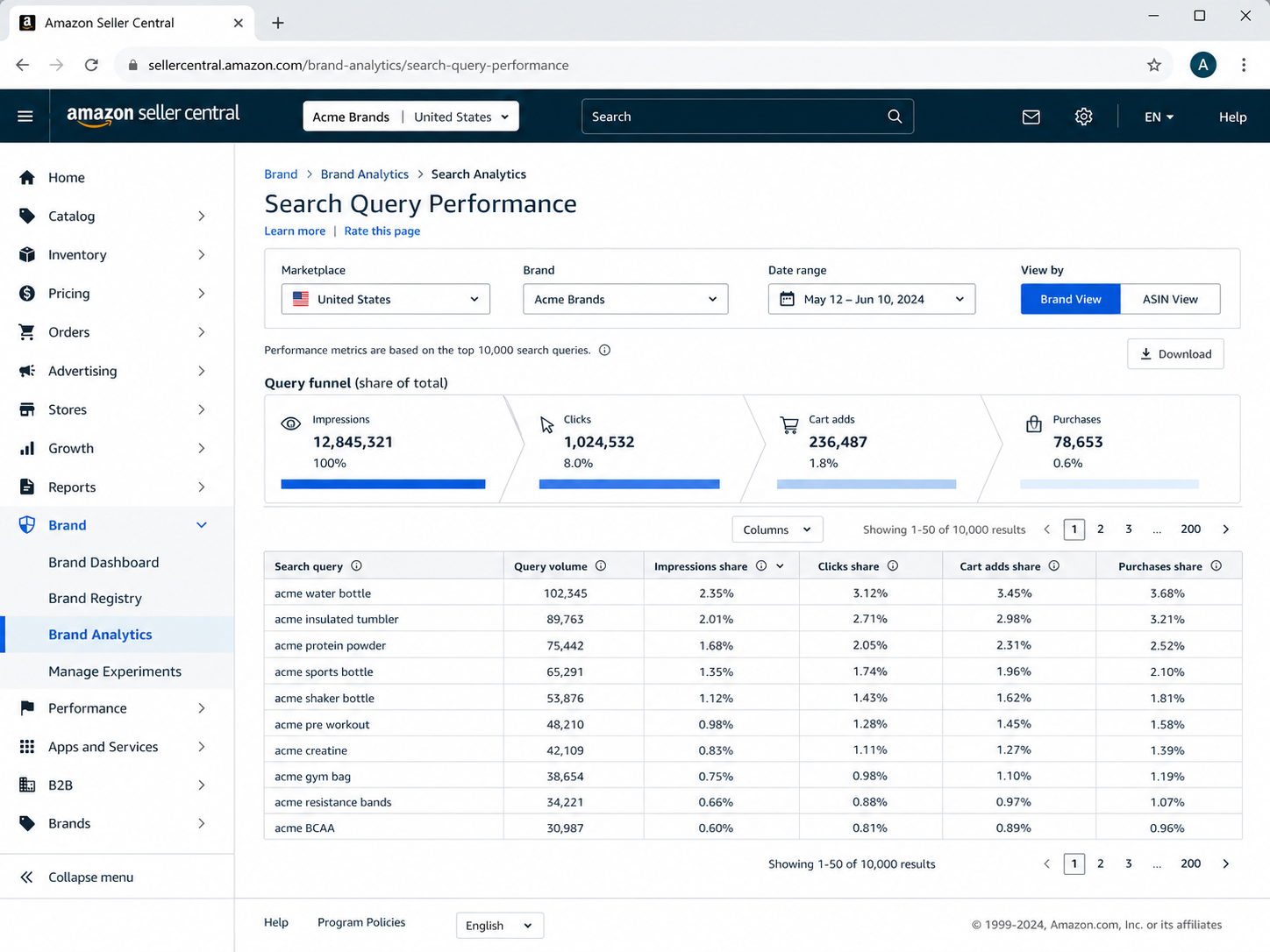
Answer the following questions with it:
- Which queries are the most important?
- Where do we have low impression share?
- Which terms are getting impressions but no clicks?
- Which ones get clicks but few cart adds?
- At what point does purchase share fall below click share?
- For a valuable query, which ASIN does not do as well?
High query volume but low impression share may indicate weak relevance, limited ad coverage, or strong competition.
High impression share and low click share indicate the search result. Check the main image, title, price, ratings, coupon, and delivery promise.
High click share but low cart-add share indicates the product page doesn't fulfill the intent. Review the benefits, dimensions, compatibility, use cases, and objections.
High add-to-cart share but low purchase share is a signal to look at the offer. Check price, stock, Buy Box, delivery, reviews, and deals.
Don’t read too much into share alone. A big share on a small query may be less important than a smaller share on a high-volume term.
Example: a priority query may have high search volume and 18% brand impression share but only 7% click share. That pattern means the product is visible but is losing at the search-results stage. Compare the top-clicked ASINs’ main image, title, price, rating, coupon, and delivery promise before increasing bids.
Search Catalog Performance
Search Catalog Performance shifts the analysis from queries to products. It includes product impressions, clicks, click rate, adds to cart, purchases, conversion rate, median price, and search funnel performance. Use it to find where an ASIN gains visibility but loses clicks, carts, or purchases.
Use it when one product (ASIN) isn’t performing well on several queries. If impressions are stable, but clicks are dropping, you need to optimize the main image, price, rating, and title. If clicks are stable but purchases are dropping, double-check the product page, inventory, fulfillment, promotion, and reviews.
Top Search Terms
Top Search Terms provides a wider view of customer demand. It can show popular terms and the products, brands, or categories that receive clicks. For each relevant term, compare the top three clicked products, categories, and brands to identify who is winning attention and whether the opportunity fits your product’s intent.
Use it for keyword discovery, competitor research, category-language analysis, product ideas, and advertising planning.
A high-volume term is not automatically a good target. The product must match the query intent. A narrower, more specific term may attract higher-quality traffic than a broad category phrase.
Market Basket Analysis
Market Basket Analysis shows products customers commonly purchase in the same order as the brand’s products.
Apply your findings to virtual bundles, Brand Store collections, A+ comparison tables, cross-sell recommendations, complementary products, and Sponsored Brands landing pages.
If you have products that customers often buy together, think about how to combine them to improve your customer’s understanding of how they work together. Use the report to inform your hypothesis, and test it. Check that there is margin room, inventory availability, packaging feasibility, price reasonableness, and demand.
For merchandising ideas, see the Amazon Storefront optimization section.
Repeat Purchase Behavior
Repeat Purchase Behavior helps brands gauge how often customers buy again. Use it to detect items for replenishment, Subscribe & Save contenders, high-retention ASINs, and products with waning repeat activity.
Think about a repurchase in terms of the category: A consumable might lead a shopper to repurchase often, whereas a durable good buyer may find themselves purchasing the same item in a different format (e.g., accessories rather than the core product).
If a product has a poor repeat-purchase record, good sense dictates analyzing return reasons, customer feedback, product quality, packaging, replenishment timing, price changes, available substitutes, etc., rather than blindly spending more on advertising.
Demographics
The Demographics dashboard provides an overview of the customer’s age, household income, education, gender, and marital status when Amazon’s reporting thresholds are met. Use these aggregated trends to develop hypotheses that can be tested for creative briefs, product positioning, Brand Store organization, and portfolio planning.
Demographics are aggregated and may not represent the preference or behavior of an individual shopper. It also depends on privacy thresholds and marketplace support.
Customer Loyalty Analytics
Customer Loyalty Analytics helps brands examine customer segments and movement across loyalty states.
Use it for retention programs, reactivation, segment-specific promotions, high-value customer engagement, and Brand Tailored Promotions where available.
Customer Journey Analytics
Customer Journey Analytics exposes the flow of consumers within the Aware, Consider, Intent, and Shop phases of the shopping process.

Use it to track the points at which customers enter the journey, whether they stay, what products lead them to further stages, and if/when in the funnel they lose momentum.
How to Use Amazon Brand Analytics for Amazon SEO
Start with Search Query Performance and Top Search Terms. Look for:
- Relevant terms with high demand and low brand share
- Non-branded queries where competitors win clicks
- Strong impressions but weak click share
- Strong clicks but weak cart adds
- Terms that convert for one ASIN but not another
- Customer wording missing from the listing
Translate the insights into actionable changes to your listings: Add prominent query language to your title and bullets, refresh backend search terms, reinforce images and A+ Content to address any lingering objections, add FAQ-style copy to address repeated shopper questions, and structure Brand Store pages around established product relations. Make one large modification at a time and measure pre- and post-test the same ABA funnel metrics.
ABA SignalLikely IssueRecommended SEO ActionInternal Link OpportunityHigh volume, low impression shareWeak relevance or limited organic or ad coverageAdd relevant terms to the listing copy, improve backend search terms, and test Sponsored Products or Sponsored Brands coverage.Amazon SEO service and Amazon product listing optimization guideHigh impressions, low clicksWeak search-result appealImprove the main image, title, price, coupon, ratings, and delivery promise.Amazon product listing optimization guideHigh clicks, low cart addsThe product detail page fails to satisfy shopper intentImprove bullet points, images, A+ Content, comparison modules, and objection handling.Amazon A+ Content guideHigh cart adds, low purchasesOffer, trust, availability, or operational issueReview price, delivery, inventory, reviews, promotions, and Buy Box status.Amazon account management or operations service pageCompetitor dominates clicksStronger competing offer or positioningAudit top-clicked ASINs, test advertising coverage, improve differentiators, and evaluate pricing.Amazon Advertising strategy or competitor-keyword guide
A product receiving clicks but few cart adds needs better on-page communication. Review images, bullets, dimensions, compatibility, use cases, A+ Content, and comparisons.
How to Use Amazon Brand Analytics for PPC and Advertising
ABA can improve advertising decisions, but it is not an ad-attribution report.
Use SQP and Top Search Terms to identify:
- High-value queries with low visibility
- Terms where competitors dominate clicks
- Queries with strong purchase behavior
- Branded terms receiving excessive paid pressure
- Non-branded opportunities for controlled tests
- Keyword and product targets for Sponsored Products or Sponsored Brands
Consider using low-intent or consistently non-converting keywords as potential negative keywords, but confirm using your Amazon Ads search term reports before blocking any traffic. Split branded versus non-branded campaigns so that budget and bidding decisions can be based on different intent and levels of competition.
Impression share can reveal visibility gaps. The metrics you should be paying attention to when it comes to clicks! Click share tells us if the search-result offering is competing. Purchase and cart-add share distinguish between traffic and conversion issues.
Bidding up on a query that is turning weakly from click to purchase may just buy you more poor traffic. Fix the product page or the offer first.
Always validate decisions in Amazon Ads reports. Review spend, clicks, attributed orders, conversion rate, CPC, ACoS, and placement performance before changing budgets.
See SalesDuo’s Amazon Advertising strategy for deeper campaign, bid, targeting, and budget support.
How to Use Brand Analytics for Product Strategy, Bundling and Retention
Product and Bundle Opportunities
Market Basket Analysis and Top Search Terms can reveal complementary products, opportunities for variation, cross-sell relationships, Store collection ideas, and product-development hypotheses.
Compare like date ranges around Prime Day, Black Friday, category-specific seasonal peaks, etc., before you commit to a pattern as permanent. Use those comparisons to isolate event-driven demand from longer-term bundling, inventory, localization, or product development opportunities.
Use a virtual bundle, coordinated Store placement, or A+ comparison content if customers frequently purchase two items together.
Retention and Repeat Purchases
Repeat Purchase Behavior and Customer Loyalty Analytics can identify subscription-friendly SKUs, replenishment cycles, high-value groups, at-risk segments, and products losing repeat customers.
A product that improves repeat behavior may justify a stronger retention investment. A product with declining repeat purchases needs to be diagnosed first.
Audience and Messaging Decisions
Demographics can support messaging hypotheses, but should not dictate them without testing.
Ask whether the creative reflects the main use case, whether the product explanation suits the buyer, whether the Store is logically organized, and whether major objections remain unanswered.
Amazon Brand Analytics vs Vendor Central Analytics
Amazon Brand Analytics is primarily for eligible Brand Registry owners and representatives using Seller Central.
Vendor Central brands may have access to separate vendor-side retail analytics depending on their agreement, marketplace, permissions, and reporting programs.
For brands searching for “Amazon Brand Analytics Vendor Central,” the practical answer is that Vendor Central users should confirm which retail reports exist in their account rather than assuming the Seller Central ABA interface will appear.
Hybrid 1P and 3P brands may need to reconcile Seller Central ABA, vendor-side reports, Amazon Ads, Business Reports, inventory and profitability data. The figures may not match because the systems use different definitions and attribution logic.
What Amazon Brand Analytics Cannot Tell You
ABA is valuable, but it is not a complete business-intelligence system.
It does not replace Business Reports, ad attribution, Amazon Marketing Cloud, Amazon Attribution, contribution-margin reporting, pricing analysis, Buy Box monitoring, inventory forecasting, review monitoring, returns analysis, or listing-quality audits.
ABA can reveal that purchase share declined. It cannot automatically identify whether the cause was price, reviews, inventory, delivery, advertising, competition, or a product issue.
It mainly provides historical and funnel signals. Teams still need to investigate the commercial context. ABA can also underrepresent low-volume or niche queries when reporting thresholds are not met. Treat an empty or sparse report as limited visibility, not proof that no demand exists, and supplement ABA with Amazon Ads search-term reports, customer questions, reviews, and broader keyword research.
ABA also does not directly score how well a listing is prepared for AI-assisted shopping. Brands must assess product attributes, content clarity, use-case coverage, and customer question handling separately.
Before making major decisions, combine ABA with sales, advertising, inventory, pricing, and profitability data.
A unified Amazon BI dashboard can bring those signals into one view.
Weekly, Monthly, and Quarterly ABA Workflow
Weekly
Review priority branded and non-branded queries, high-volume terms with low share, impression-to-click losses, click-to-cart losses, cart-to-purchase losses, major ASIN changes, and competitor movement.
End with a short action list. Prioritize issues affecting high-volume queries, top ASINs, or meaningful revenue.
Monthly
Review Top Search Terms, Market Basket Analysis, Repeat Purchase Behavior, Customer Loyalty Analytics, downloaded trends, branded-versus-non-branded movement, and the performance of listing, A+ Content, or Brand Store updates.
Quarterly
Review Customer Journey Analytics, demographic changes, product roadmap, category expansion, bundle opportunities, retention strategy, portfolio performance, and BI integration.
Maintain a tracker with the finding, report, metric, owner, action, due date, validation period, and outcome.
Common Amazon Brand Analytics Mistakes
- Treating ABA as exact sales reporting instead of using Business Reports for reconciliation.
- Looking only at Top Search Terms and ignoring query-level funnel data.
- Ignoring Brand View versus ASIN View.
- Acting on percentages without checking volume.
- Focusing on clicks while ignoring cart-add and purchase share.
- Assuming ABA and ad reports use identical attribution logic.
- Failing to download historical reports.
- Reviewing ABA in isolation instead of validating actions against Amazon Ads, Business Reports, inventory, and profitability data.
- Assuming every marketplace and user role exposes the same dashboards without checking account eligibility and permissions.
- Treating basket data as automatic proof of bundle demand.
- Changing the title, images, price, and campaigns together, making it impossible to isolate the result.
Need Help Turning ABA Into Growth Actions?
Amazon Brand Analytics can show what shoppers searched for, where they left the funnel, what they bought together, and whether they returned.
Those insights become more useful when reviewed alongside Amazon SEO, advertising, Business Reports, A+ Content, Storefront performance, pricing, inventory, and profitability data.
SalesDuo helps brands turn Brand Analytics, Search Query Performance, PPC data, Business Reports, and Storefront performance into prioritized growth actions.
Putting Amazon Brand Analytics findings into practice often requires coordination across ads, listings, and operations, which a full-service Amazon agency can manage.
Book a 1:1 growth call with SalesDuo.
Frequently Asked Questions About Amazon Brand Analytics
What is Amazon Brand Analytics?
It is a suite of Seller Central dashboards that provides eligible brands with aggregated data on search, purchase, loyalty, and product interactions.
Who can use Amazon Brand Analytics?
Users generally need a Professional selling account and a Brand Representative role to be associated with a brand enrolled in Brand Registry.
How do I access Amazon Brand Analytics?
Sign in to Seller Central, open Brands, select Brand Analytics, and choose the dashboard, marketplace, brand, ASIN, and date range.
Where is Brand Analytics on Amazon?
Eligible users can usually find it under Brands → Brand Analytics. If it is missing, check permissions, Brand Registry status, and marketplace selection.
Is Amazon Brand Analytics free?
Amazon does not charge a separate ABA subscription fee, but the eligibility requirements for Professional accounts and Brand Registry still apply.
What reports are included?
Core dashboards include Search Query Performance, Search Catalog Performance, Top Search Terms, Market Basket Analysis, Repeat Purchase Behavior, Demographics, Customer Loyalty Analytics, and Customer Journey Analytics.
How do you use ABA for keyword research?
Use SQP to review query volume and funnel share. Use Top Search Terms to identify popular searches and top-clicked products. Prioritize relevant terms tied to a clear action.
How is SQP different from Top Search Terms?
SQP focuses on brand and ASIN funnel performance for relevant queries. Top Search Terms provides a broader view of the marketplace for popular searches and leading products or brands.
Can ABA help with PPC?
Yes. It can reveal visibility gaps, competitor-dominated terms, and queries with stronger purchase potential. Validate every campaign change in Amazon Ads reports.
How is ABA different from Vendor Central analytics?
ABA is mainly accessed in Seller Central by eligible Brand Registry representatives. Vendor Central may provide separate retail analytics with different metrics, permissions, and definitions.
About the Author
Giridhara Prasad is an Associate Director at SalesDuo and a startup enthusiast. With extensive expertise in e-commerce, this ex-Amazonian has been instrumental in driving success for businesses worldwide. Apart from his passion for creating innovative sales strategies and optimizing online retail experiences, Giri finds interest in watching and playing sports, including starting to play pickleball, traveling, and exploring political science, and philosophy.